Exit Intent Popup: What It Is, How It Works & Why Every Website Needs One (2026)
March 30, 2026
10
Min Read Time
Your paid ads are running. Your SEO is working. Visitors are landing on your pages. But here's the part most businesses don't talk about: over 95% of those visitors will leave your website without doing anything, no purchase, no email, no signup, no demo booking. They just close the tab and they're gone, possibly forever.
This is the exact problem an exit intent popup is built to solve. It's one of the highest-ROI conversion tools available to any website, and unlike most marketing tactics, it works on the traffic you already have, without spending an extra rupee on ads or SEO.
In this guide, you'll learn exactly what an exit intent popup is, how exit intent technology works, why every website needs one in 2026, and how to set one up in under five minutes using a no code exit intent popup builder.
What Is an Exit Intent Popup?
An exit intent popup is a type of popup that fires at the exact moment a visitor is about to leave your website. Instead of appearing when someone arrives or after an arbitrary timer, it waits, and then shows your most important message at the highest-intent moment: when the visitor is on their way out.
The result is a perfectly timed, relevant offer that feels less intrusive than a popup that hits you the second you land on a page, and significantly more effective than hoping visitors will scroll back up and find your signup form.
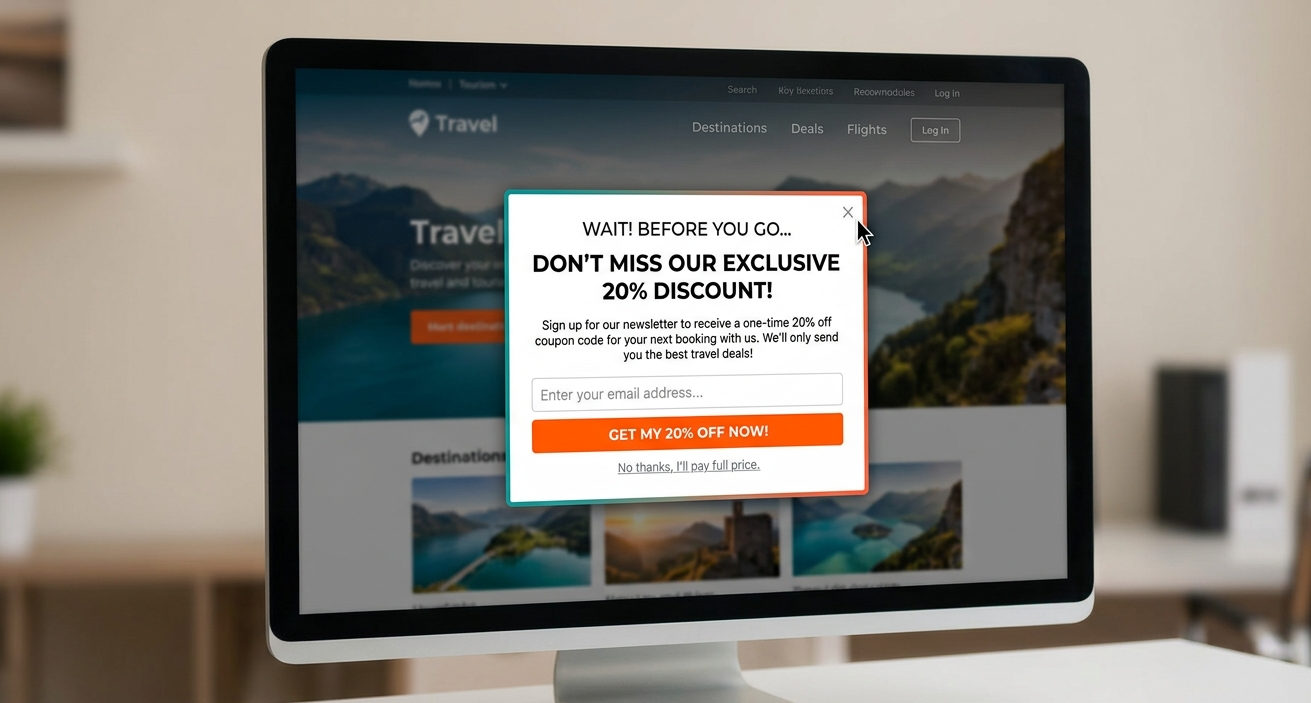
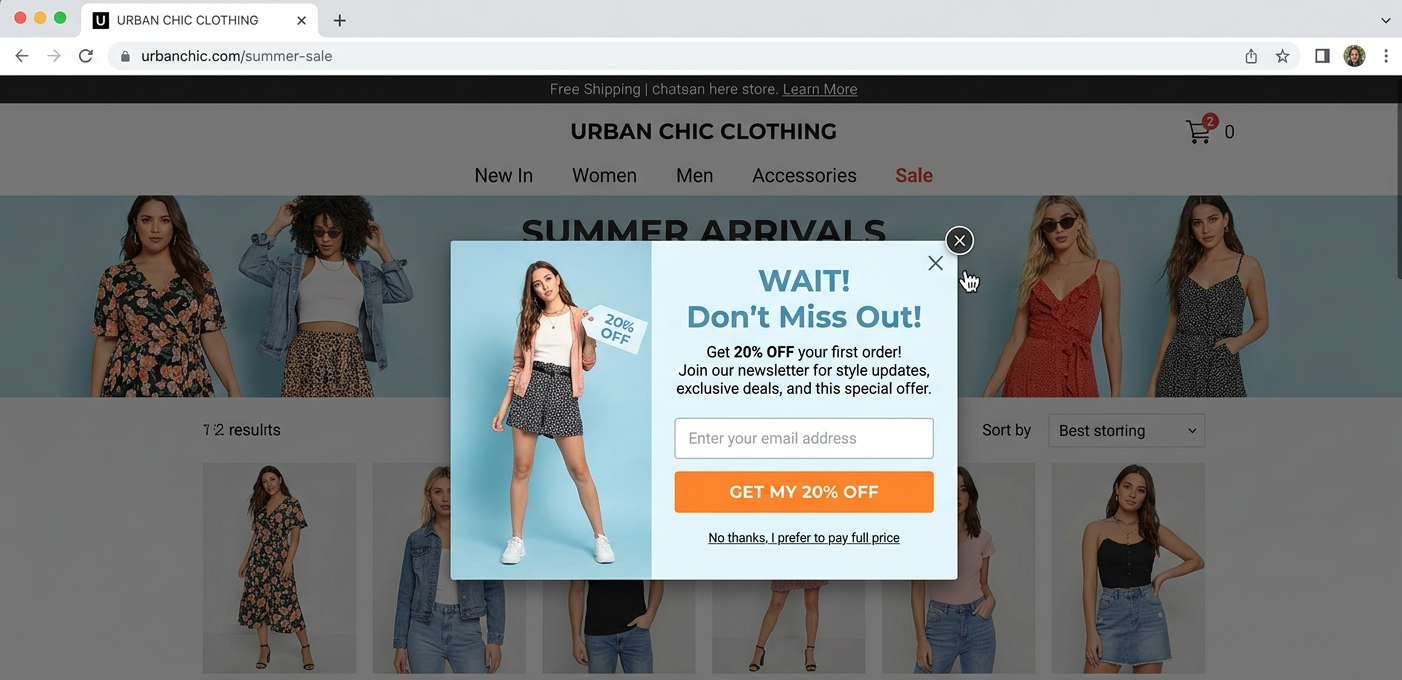
If you've ever been about to close a browser tab and seen a popup saying "Wait, here's 10% off" or "Before you go, grab your free guide", that's an exit intent popup in action.
How Is It Different from a Regular Popup?
Most popups are triggered by time (show after 30 seconds) or by page load (show immediately). An exit intent popup is triggered by visitor behavior, specifically, the motion of leaving. Here's how the two compare:
Feature
Exit Intent Popup
Regular Popup
When It Fires
When visitor moves cursor toward close/back
On page load or after time delay
Visitor Intent
High — they've read your content
Low — they just arrived
Average Conversion Rate
1.96–8%
0.5–3%
User Experience
Non-intrusive (fires on exit)
Can feel interruptive
Google Penalty Risk
✅ Low — fires at exit, not on load
⚠️ Risk on mobile if fired too early
Best Use
Last-chance offer, cart recovery
Welcome offer, announcement
The fundamental difference is timing. A regular popup interrupts. An exit intent popup rescues.
How Does Exit Intent Technology Work?
Understanding how exit intent technology works helps you use it more intelligently. The mechanism is simpler than it sounds.
Exit intent technology uses a lightweight JavaScript script embedded on your website. This script tracks your visitor's mouse movement in real time, specifically, the velocity and direction of the cursor. When the cursor accelerates toward the top portion of the browser window (where the close button, back button, or address bar lives), the script interprets that as an exit signal and fires the popup instantly, before the visitor has a chance to click away.
On mobile devices, the detection method is different because there's no cursor. Mobile exit intent typically uses scroll behavior, detecting when a visitor scrolls upward quickly, which often indicates they're about to swipe back to the previous page.
The entire detection and trigger sequence happens in milliseconds. The visitor sees the popup before they've closed the tab.
What Triggers an Exit Intent Popup?
Specifically, here's what activates an exit intent popup for website visitors:
Cursor movement toward the browser's top edge (desktop) is the most common and reliable trigger
A rapid upward scroll on mobile indicates the visitor is preparing to leave
Browser back button detection, some tools detect back-navigation intent
Tab switching: the visitor switches to a different browser tab
Time-on-site, combined with inactivity, some tools combine exit intent with a time delay for a secondary trigger In SuperPopups, the exit intent trigger is built directly into the popup settings. You toggle it on, and the system handles all the detection, no coding, no custom JavaScript needed.
Do Exit Intent Popups Really Work? (Conversion Rate Data)
This is the question that matters most before you invest time in setting one up. The short answer is: yes, significantly, but the range of results is wide depending on your offer, timing, and design.
Here is what the verified 2026 data shows for exit intent popup conversion rates across different industries and use cases — including cart abandonment, SaaS, and content sites:
Industry / Use Case
Average Conversion Rate
Top Performer Rate
Ecommerce (Discount Offer)
5–7%
Up to 12%
SaaS (Free Trial Popup)
4–8%
Up to 14%
Blog / Content (Email Capture)
3–6%
Up to 10%
Agency / Service (Demo Request)
2–4%
Up to 8%
General Website (Lead Capture)
1.96–5%
Up to 9%
To put those numbers in real terms: if your website gets 10,000 visitors per month and 70% leave without converting, a cart abandonment exit intent popup converting at 17.12% recovers over 1,190 lost visitors every single month, from traffic you have already paid for. Even a conservative 3% general conversion rate recovers 210 leads per month.
That's not a small number. For a SaaS business where each trial signup has a potential LTV of $500–$5,000, recovering 210 signups per month from a single popup campaign is a meaningful revenue lever.
The businesses that see the highest exit intent popup conversion rates share three things: a genuinely valuable offer, a short and clear headline, and tight page targeting so the popup is relevant to what the visitor was just reading.
Why Does Every Website Need an Exit Intent Popup?
Whether you're running an exit intent popup for ecommerce, a SaaS product, a content blog, or a service business, the core argument is the same: you've already paid (in money, time, or effort) to get visitors to your website. An exit intent popup is the mechanism that lets you recover a portion of those visitors before they disappear.
Recover Abandoning Visitors Before They're Gone
The hardest part of digital marketing isn't getting traffic, it's keeping it long enough to convert. The average website converts 1–3% of its visitors. The other 97% leave. Without an exit intent popup, 100% of those departing visitors are lost permanently.
With an exit intent popup, you get one more shot. Not a desperate, generic shot, a targeted, well-timed offer that matches what the visitor was just looking at. That's the fundamental value of exit intent: it converts a goodbye into a decision point.
Grow Your Email List Without More Traffic
One of the best uses of an exit intent popup for website email capture is the simplest one: show a popup that offers a lead magnet or newsletter value prop just as the visitor is leaving.
This works especially well on blogs and content-heavy sites. Someone who has read 80% of your article and is about to close the tab is demonstrably interested in your content; they just weren't ready to subscribe yet. An exit popup saying "Get this article + 10 more like it straight to your inbox" converts far better than a static sidebar form, because it appears at the moment of peak engagement, not the moment of arrival.
Email lists built through exit intent popups also tend to be higher quality because the subscribers had enough interest to read meaningful content before subscribing, rather than being captured by an aggressive welcome popup the moment they landed.
Reduce Cart Abandonment for Ecommerce Stores
This is the headline use case for cart abandonment exit intent popup campaigns. The numbers are stark: studies consistently show that 70–80% of online shopping carts are abandoned before checkout. That means for every 10 customers who add something to their cart, 7–8 leave without buying.
An exit intent popup on the cart or checkout page, triggered the moment the visitor moves toward closing the browser, can offer a last-minute discount, free shipping, or a "save your cart" option. Well-executed exit intent popup for ecommerce campaigns recover 5–7% of abandoned cart visitors, which translates directly to recovered revenue with zero incremental ad spend.
For a Shopify store doing $100,000 per month in revenue, recovering even 3% of abandoned carts via an exit popup is worth $3,000+ per month. The ROI on a popup tool that costs $29/month is immediate and obvious.
Promote Free Trials and Reduce Churn for SaaS
For exit intent popup for SaaS businesses, the two most valuable use cases are acquisition and retention.
On the acquisition side: a visitor reading your pricing page and then moving to close the tab is one of the most qualified leads you'll ever get. They compared your plans, maybe checked out your FAQ, and decided not to sign up, but they were clearly interested. An exit popup offering a 14-day free trial with no credit card required, or a limited-time discount on the annual plan, can convert a significant portion of these pricing page abandonments into trial users.
On the retention side: when existing users or trial users try to cancel or navigate away from your app, an exit intent popup can offer support, a downgrade option, or a discount on the annual plan. SaaS companies using this tactic report 10–15% reductions in trial-to-paid drop-off rates.
Recover Paid Traffic Investment
If you're running Google Ads, Meta Ads, or any paid channel, every visitor who leaves without converting is costing you money. An exit intent popup is, in effect, a way to squeeze more ROI out of your existing ad spend without increasing your budget.
Consider the math: if you're paying ₹50 per click and your site converts at 2%, you're paying ₹2,500 per conversion. An exit intent popup that converts an additional 3% of departing visitors could drop your effective cost per conversion dramatically — because you're extracting more conversions from the same traffic you've already paid for.
This is why exit intent popup strategy is increasingly treated as a paid media amplifier, not just a passive lead capture tool.
Exit Intent Popup Examples: 6 Real-World Use Cases
Here's how different types of businesses use exit popup examples in practice — including copy templates you can adapt immediately.
Ecommerce: Cart Abandonment Recovery
Scenario: Visitor has added items to cart, visits the checkout page, and moves to close the browser.
Popup Headline:"Wait, complete your order and get 10% off. Use code: STAY10" CTA Button:"Claim My Discount" Secondary Link:"No thanks, I'll pay full price"
This is the most common exit intent popup for ecommerce use case. The offer is specific (10% off), the urgency is natural (they were literally mid-checkout), and the CTA is action-oriented. For exit intent popup Shopify stores, this popup should be set to trigger only on cart and checkout pages, not sitewide.
SaaS: Free Trial Signup Popup
Scenario: Visitor has read the pricing page or features page and moves to close the tab.
Popup Headline:"Before you go, start your free 14-day trial. No credit card required." CTA Button:"Start Free Trial" Supporting Line:"Join 10,000+ teams already using [Product]"
This is the most valuable exit popup a SaaS business can run. Pricing page visitors are the highest-intent segment on your entire website, they were one step from signing up. The social proof line ("10,000+ teams") reduces friction at the exact moment the visitor is hesitating.
Blog / Content Site: Email Capture
Scenario: Reader has scrolled through most of a blog post and moves to close the tab.
Popup Headline:"Get this guide in your inbox, plus 10 more like it. Free." CTA Button:"Send Me the Guide" Form: Email field only, no name required
This is the classic exit intent popup for content sites. The reader has already demonstrated interest by reading the article, the popup simply asks for the email in exchange for making the content more accessible. One-field forms (email only) consistently outperform two-field forms (name + email) by 20–30% in exit intent contexts.
Agency / Service Business: Demo Request
Scenario: Potential client has visited your services page or case studies and is about to leave.
Popup Headline:"Book a 15-minute intro call before you go, no obligation." CTA Button:"Book My Free Call" Supporting Line: "We'll show you exactly how we'd approach your project."
For agencies and service businesses, the goal of an exit intent popup for website visitors is not to sell, it's to get a conversation. Removing the word "demo" and replacing it with "15-minute intro call" or "quick chat" reduces perceived commitment and increases bookings.
How to Add an Exit Intent Popup to Your Website in 5 Minutes (No Code)
This is the step-by-step guide for setting up a no-code exit intent popup using SuperPopups, A free exit intent popup builder that works on any platform. Whether you need an exit intent popup for WordPress, an exit intent popup for Shopify, or any custom site, the process is identical.
From the dashboard, click the button to create a new popup campaign.
Step 3: Choose your template
Browse the popup templates library and select a design that fits your goal, email capture, cart recovery, free trial, or demo request. All templates are professionally designed and mobile-responsive out of the box.
Step 4: Customize your content
In the no-code visual editor, update the headline, body text, CTA button copy, and colors to match your brand. Use the copy templates from the section above as your starting point.
Step 5: Set trigger to "Exit Intent"
In the trigger settings, select Exit Intent. This tells SuperPopups to fire the popup when the visitor's cursor moves toward the close/back area of the browser.
Step 6: Configure your targeting rules
Set which pages the popup should appear on (all pages, specific pages, or exclude certain pages). Set device targeting (desktop, mobile, or both). Set display frequency, "once per session" is the recommended default, so the same visitor doesn't see it on every page.
Step 7: Copy the embed script and go live
SuperPopups generates a single lightweight script (under 50KB). Copy it and paste it just before the closing </body> tag on your website. For WordPress, use the Insert Headers and Footers plugin. For Shopify, paste into the theme. liquid. Save and publish, your exit intent popup is live.
Exit Intent Popup Best Practices (What Works in 2026)
Following proven exit intent popup best practices is the difference between a popup that converts at 2% and one that converts at 8%. Here are the rules that consistently matter most:
Best Practice
Why It Matters
Quick Implementation Tip
Lead with the benefit
"Get 10% off" outperforms "Don't leave" every time
Start your headline with what they gain, not what you want
Single CTA only
Multiple CTAs reduce conversions by splitting attention
One button, one action, one decision
Email field only
Every extra form field drops conversion rate ~10%
Collect name separately via email follow-up
Mobile-responsive design
60%+ of web traffic is mobile in 2026
Preview your popup on mobile before publishing
Frequency cap: once per session
Repeat popups frustrate visitors
Set display frequency to "every session" in SuperPopups
Page-specific targeting
Pricing page visitor needs different offer than blog reader
Use page targeting to match offer to page context
A/B test the headline
Headline is the single biggest conversion lever
Run 2 versions for 100 views minimum before deciding
Lightweight script
Heavy popup scripts hurt Core Web Vitals and page speed
SuperPopups uses a <50KB async script — no speed impact
The single best exit intent popup strategy for most businesses is this: start with one popup on your highest-traffic page, use a simple discount or free resource offer, cap frequency at once per session, and run an A/B test after the first 200 views. Optimize from there.
Exit Intent Popup vs. Time Delay Popup: Which Is Better?
This is one of the most common questions in exit intent popup strategy planning. The honest answer is: it depends on your goal and the page. But here's a direct comparison:
Both triggers have their place. Many businesses run both simultaneously: a time delay popup on blog posts for email capture, and an exit intent popup on product and pricing pages for cart recovery and free trial signups. The two work together rather than competing.
The key principle: exit intent outperforms time delay on high-intent pages (pricing, cart, checkout) because it fires at the moment of highest decision-making urgency. On content pages where the visitor is still reading and engaged, a time delay popup at 30–45 seconds often performs better because it catches the visitor while they're still actively interested.
An exit intent popup is a popup that fires when a visitor's mouse cursor moves toward the browser's close button or back navigation, detecting the exit signal and triggering a last-chance offer or message before the visitor leaves the page.
2) How does exit intent technology work?
Exit intent technology uses a JavaScript script that tracks the velocity and direction of the visitor's mouse in real time. When the cursor accelerates toward the top of the browser window, the script registers an exit signal and triggers the popup instantly, before the tab is closed.
3) Do exit intent popups really work?
Yes. Exit intent popups average 1.96–8% conversion rates depending on the industry and offer. For ecommerce cart recovery, top campaigns reach 10–12%. For SaaS free trial signups, well-targeted exit popups convert at 4–8%.
4) What is a good conversion rate for an exit intent popup?
A good exit intent popup conversion rate is 3–5% for most websites. Ecommerce discount campaigns can reach 8–12%. The most important benchmarks to beat are your own, even a 2% exit intent conversion rate represents visitors you were previously losing completely.
5) Are exit intent popups bad for SEO?
No. Google's intrusive interstitial penalty applies to popups that block content on page load, particularly on mobile. An exit intent popup fires when the visitor is leaving, not when content is loading, so it falls outside Google's penalty criteria. It also doesn't affect Core Web Vitals when implemented with a lightweight, async script.
6) How do I add an exit intent popup to my website without code?
Use SuperPopups. Sign up for free, choose an exit intent template, customize your headline and CTA, toggle on the exit intent trigger, configure your targeting settings, and paste one embed script before the </body> tag on your site. The whole setup takes under 5 minutes.
7) What should an exit intent popup say?
Lead with the benefit, not the ask. "Get 10% off before you go" outperforms "Wait, don't leave!" every time. Use a short headline (under 12 words), one CTA button with action-oriented copy, and limit the form to email only for maximum conversions.
8) What is the best exit intent popup tool in 2026?
SuperPopups is one of the best exit intent popup free plan tools available in 2026. It offers a lightweight <50KB script that doesn't affect site speed, works on Shopify, WordPress, and Webflow without any coding, includes a free plan, and delivers real-time analytics on every campaign.
Ready to Add an Exit Intent Popup to Your Website?
The math is straightforward. Your website is already getting traffic. A meaningful percentage of those visitors are leaving without converting. An exit intent popup, when built with the right offer, the right targeting, and the right timing, recovers a portion of those visitors and converts them into leads, trial users, email subscribers, or customers.
You don't need a developer. You don't need a designer. You don't need to wait.
With SuperPopups, you can build your first no-code exit intent popup in under five minutes, for free. Choose from professionally designed templates, set your exit intent trigger, configure your page and device targeting, and go live today.
Every day you wait, visitors are leaving your website and never coming back. An exit intent popup gives them one more reason to stay.
The SuperPopups Team is a collective of writers and growth marketers who blend storytelling with conversion strategy. We break down complex CRO, popup optimization, and on-site engagement tactics into clear, practical content that teams can actually use. Our mission is simple: create helpful, data-driven resources that empower businesses to boost conversions, improve user experience, and grow smarter.
More Articles
May 22, 2026
13
Min Read Time
How to Set Up a Popup Funnel That Nurtures Visitors from First Visit to Conversion
Learn how to set up a popup funnel that nurtures visitors from first visit to conversion with the right popup strategy, timing, and offers.
How to Use Popups with Google Ads Landing Pages Without Hurting Quality Score
Popups can hurt your Google Ads Quality Score, but only the wrong ones. Learn which popup formats are safe for PPC landing pages and how to set them up.
What Is Popup Fatigue and How to Avoid It on Your Website
Popup fatigue kills conversions silently. Learn what it is, what causes it, and 6 proven fixes to avoid it on your website without removing your popups.
Sleeknote Alternatives: Best Popup Builders to Consider in 2026
Sleeknote too expensive? Discover the 4 best popup builder alternatives in 2026, one is free forever. Compare features, pricing & find the right fit for you.
Popups for Online Coaches and Course Creators: Grow Your List and Sell More Courses
Coaches lose leads daily from visitors who don't subscribe or enroll. Learn how popups for online coaches grow your list and sell more courses, FREE with SuperPopups.
Popup for Restaurant Websites: How to Drive More Reservations and Signups
Do restaurant websites need popups? Yes, they convert menu browsers into table bookings and email signups. See which popup types work best, free with SuperPopups.
Popup for Real Estate Websites: How Agents Capture More Leads Online
Real estate agents lose leads daily from property browsers who don't enquire. Learn how a popup for real estate websites captures more leads free with SuperPopups.
Cart Abandonment vs Exit Intent: What's the Difference and Which Should You Use?
Cart abandonment popups convert at up to 17% on cart pages. Exit intent works on every page. Learn the real difference and when to use each, plus how to set both up free.
How to Use Popups to Grow a Shopify Store: Complete 2026 Strategy Guide
Want to grow your Shopify store with popups? This 2026 guide covers every popup type, trigger, placement & setup, email capture, exit intent, cart abandonment & more.
How to Add a Popup to Wix Without a Plugin (No Code)
Learn how to add a popup to Wix without a plugin using no-code methods. Follow our simple step-by-step guide to create stunning popups on your Wix website fast.
How to Add a Popup to Your Squarespace Website (No Code)
Learn how to add a popup to your Squarespace website without any code or plugin. Use SuperPopups to launch email capture, exit intent & discount popups in minutes.
How to Use Popups on Blog Posts Without Hurting Readership
Learn how to add popups to blog posts without hurting readership. Timing, triggers & placement tips to grow your email list while keeping readers engaged.
Free Popup Builder for Small Businesses: Best No-Cost Tool in 2026
The best free popup builder for small businesses in 2026, No credit card, no code, no expiry. Capture emails, recover abandoning visitors, and grow sales from day one.
Popup Templates: How to Choose the Right Design for Your Goal
Discover how to choose the right popup templates for your goal. Explore popup design tips to boost conversions, grow leads, and engage visitors effectively.
How to Create a Popup for Your WordPress Website (Free, No Plugin Required)
Create a popup for your WordPress website in under 5 minutes, free, no plugin, no coding. Step-by-step setup guide using a lightweight script that won't slow your site.
How to Use Popups to Promote Flash Sales and Limited-Time Offers
Learn how to use flash sale popups to drive urgency, boost conversions, and promote limited-time offers, with countdown timers, triggers, and real examples.
Newsletter Popup: How to Get More Subscribers Without Being Annoying
Learn how to use a newsletter popup to grow your subscriber list fast, without annoying visitors. Tips to boost signups while keeping your user experience smooth.
Do Popups Affect SEO? How to Use Them Without Getting Penalized
Popups don't hurt SEO, unless they break one Google rule. Learn which popups trigger the intrusive interstitial penalty and how to use them safely in 2026.
Add a popup to your Shopify store without installing an app. One lightweight script, no code, no App Store fees, live in under 10 minutes. Here's exactly how to do it.
Popup vs Banner: What's the Difference and Which Converts Better?
Popup vs banner, what's the difference, and which converts better? Compare both formats and find out which drives more leads, clicks, and sales for your website.
Learn how to write popup copy that converts, headline formulas, CTA button text, and micro-copy tips backed by data. First-person CTAs alone can lift clicks by 90%.
Popup for Ecommerce: How to Use Popups to Increase Sales
70% of shoppers abandon their cart. Ecommerce popups fix that. Learn which popup types convert best, what to offer, and how to set one up in under 10 minutes.
Learn how to reduce bounce rate with exit intent popups. Discover proven strategies to re-engage leaving visitors and boost conversions on your website.
How to Use Popups for Lead Generation (Complete Guide)
Learn how to use popups for lead generation with proven strategies, timing tips, and design best practices to capture more leads and grow your email list fast.
Popup Conversion Rate: What's a Good Rate & How to Improve It
Learn what a good popup conversion rate is, industry benchmarks, and proven tips to improve your popup performance and boost conversions. Start optimizing today.
Email Capture Popup: How to Grow Your Email List Faster
Learn how email capture popups grow your email list faster. Types, triggers, best practices & real examples. Start converting visitors into subscribers today.
How to Add a Popup to Your Website in 5 Minutes (No Code)
Learn how to add a popup to your website in just 5 minutes, no coding required. Step-by-step guide to launch your first popup and capture more leads today.
No-Code Popup Builder: What It Is & Why It Matters (2026)
A no-code popup builder lets you create exit intent, email capture & discount popups without coding. Learn what it is, how it works & why it matters in 2026.
Looking for the best popup builder for Shopify? This 2026 guide covers top tools for exit intent popups, email capture, discount popups, and cart abandonment, with free plan options included.
Popup Design Best Practices: UI, UX & Psychology for Higher Conversions 2026
Popup design best practices 2026: UI, UX, and psychology tips to create high‑converting popups that reduce friction, boost engagement, and respect user experience.
Popup Builder vs WordPress Popup Plugin: Which is Better in 2026?
WordPress popup plugins slow your site 30-50%. Script-based builders like SuperPopups are faster, flexible, and work on any platform. Free plan available.
Top 5 OptinMonster Alternatives to Boost Conversions in 2026
Looking for the best OptinMonster alternatives? Find top 5 powerful popup and lead generation tools for 2026 with features, pricing, and tips to boost conversions
What Is a Lightbox Popup and Why SaaS Businesses Should Use It?
Learn what a lightbox popup is and why it is most importance for SaaS businesses. Know about its benefits, examples, and tools to increase sign-ups and engagement.
Find the top 10 best popup builders of 2025 to boost conversions, capture leads, and reduce cart abandonment. Compare features and pricing to choose the right popup software for your website.
What Are the Types of Website Popups? The Complete Guide for SaaS Businesses in 2025
Learn the different types of popups, designed to boost conversions without ruining user experience. And how SuperPopups help your SaaS business growth.
SuperPopups vs. OptiMonk: Complete Comparison Guide 2026
Compare SuperPopups vs. OptiMonk to find the best popup builder for your business. Find key differences in pricing, features, ease of use, and conversion performanceupdated for 2025.
Find the Webflow powerful pop-up builder tool to boost conversions, capture leads, and enhance user engagement without coding. Easily create, customize, and manage popups in Webflow.


.jpg)
.avif)








.jpg)










.jpg)



.jpg)






.jpg)
.jpg)


.jpg)







