Email Capture Popup: How to Grow Your Email List Faster
March 31, 2026
10
Min Read Time
You're getting website traffic. People are landing on your pages, reading your content, checking your pricing, and then leaving. No name, no email, no way to follow up. That's where an email capture popup changes everything.
An email capture popup is a targeted overlay that appears on your website to collect visitor email addresses, usually by offering something valuable in return, like a discount, free guide, or exclusive content. It turns one-time visitors into long-term subscribers, and subscribers into paying customers.
In this guide, you'll learn what email capture popups are, the different types available, how to set one up step by step, best practices that actually move the needle, real-world examples, and the most common mistakes to avoid. Whether you're running a blog, an eCommerce store, or a SaaS product, this is your complete roadmap to growing your email list faster.
What Is an Email Capture Popup?
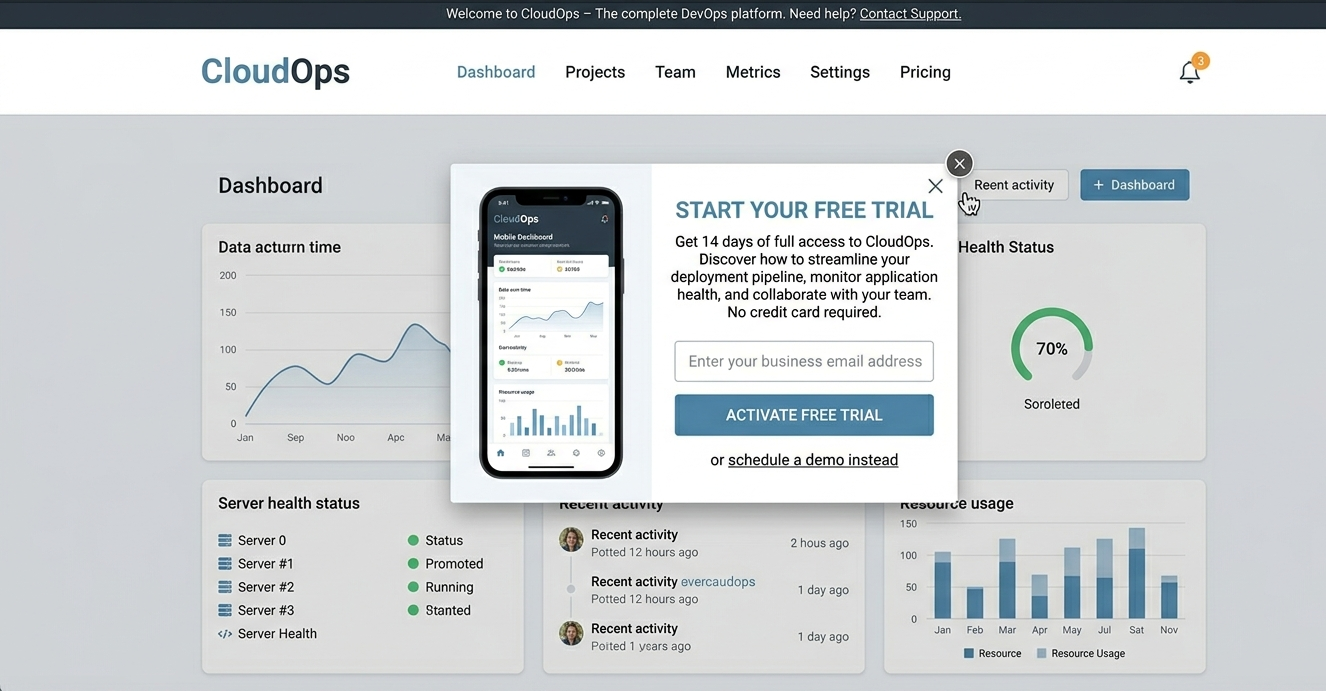
An email capture popup is a website overlay, a box, slide-in, or full-screen panel that appears at a specific moment while someone is browsing your site, with the primary goal of collecting their email address. It typically includes a headline, a single input field, and a call-to-action (CTA) button.
Unlike a static embedded form buried in your sidebar or footer, a popup is dynamic. It appears based on visitor behavior, when they've scrolled far enough, spent enough time, or are about to leave. This behavioral targeting is exactly why popups outperform passive forms.
A complete email capture popup typically includes:
Headline: A clear, benefit-driven statement (e.g., "Get 20% Off Your First Order")
Email input field: Just one field; more fields = fewer conversions
CTA button: Action-oriented text like "Claim My Discount" or "Send Me the Guide"
Trust signal: Micro-copy like "No spam. Unsubscribe anytime."
Optional image or icon: Adds visual personality and increases click-through
This isn't just a form. It's your first, and often most important, conversion touchpoint on your website.
Why Should You Use an Email Capture Popup to Grow Your List?
Put simply: because it works better than everything else. A well-configured email list building popup reaches visitors at exactly the right moment, making them far more likely to subscribe than if they stumbled across a form on their own.
Real data: Based on analysis of over 1.24 billion popup displays in 2025, email capture popups collected 26.4 million emails — a 44% increase year-over-year. The average email popup conversion rate is 4.82% across all formats, with click-triggered popups reaching 54.42% and top-performing campaigns hitting 19.77% of visitors. For most websites, even achieving the 4.82% average means capturing hundreds of additional subscribers every month from traffic already landing on your pages.
Here's why marketers and business owners rely on popups to collect emails:
They convert passive visitors into active subscribers, people who would never seek out a signup form are caught at the right moment
They work 24/7, automatically, set once, run continuously without manual effort
They're cost-effective, growing a subscriber base via popups costs a fraction of paid ad spend for equivalent leads
They pair powerfully with lead magnets, adding a free incentive can double or triple conversion rates
They're measurable, you can A/B test, segment, and optimize based on real data
Every day you run your website without a website popup to increase subscribers is a day you're leaving leads on the table.
What Are the Different Types of Email Capture Popups?
Not every popup serves the same purpose. Choosing the right type for the right situation is one of the highest-leverage decisions you'll make. Here's a breakdown of the six main types:
Popup Type
Best For
Trigger
Exit-Intent Popup
Recovering abandoning visitors
Mouse moves toward browser bar or back button
Time-Delay Popup
Engaged readers, blog visitors
4–15 seconds after page load
Scroll-Triggered Popup
Mid-funnel, long-form content readers
40–60% page scroll depth
Welcome Mat (Full-Screen)
Maximum visibility, top-of-funnel capture
Immediately on page load
Floating Bar
Non-intrusive, always-visible nudge
Persistent at top or bottom of screen
Multi-Step Popup
Higher intent, segmented list building
Click-triggered, question-first flow
Each of these can be built without a single line of code using a no-code popup builder like SuperPopups. You simply pick a template, customize it, set the trigger, and it's live.
How to Create an Email Capture Popup (Step-by-Step Guide)
Creating an effective email signup popup doesn't require a developer or weeks of setup. Here's how to go from zero to live in under 30 minutes:
Step 1: Choose a Free No-Code Popup Builder
Start with a tool that gives you design flexibility, behavioral triggers, and integration options without requiring code.
SuperPopups — Popup builder is built exactly for this, no coding, no complex setup, works on Webflow, WordPress, Shopify, and more.
Step 2: Pick an Email Capture Template
Don't start from scratch. Choose a pre-built popup template, newsletter signup, eBook offer, discount capture, or free trial welcome popup. A good template already has a proven layout structure.
Step 3: Customize Your Headline and CTA
Your headline should communicate a clear outcome. Instead of "Sign Up for Our Newsletter," write "Get Weekly Growth Tips Delivered to Your Inbox." Your CTA button should use first-person voice: "Send Me the Tips" beats "Subscribe" every time.
Step 4: Set Your Trigger
Decide when the popup fires. For blog posts, a 50% scroll trigger works well. For product pages, exit-intent is ideal. For SaaS landing pages, a time-delay of 8–10 seconds performs strongly.
Step 5: Configure Targeting Rules
Show the popup only to the right people. Target new visitors vs. returning users, specific pages vs. sitewide, desktop vs. mobile, or traffic from specific campaigns. Better targeting = higher relevance = better conversions.
Step 6: Connect to Your Email Marketing Tool
Integrate with your email platform, Mailchimp, HubSpot, ActiveCampaign, ConvertKit, or others. Every new subscriber should flow directly into your list, tagged and ready for automated follow-up.
Step 7: Embed the Script on Your Website
Add one lightweight JavaScript snippet to your site's <head> tag. SuperPopups gives you this code in one click; it loads asynchronously, so it never slows down your page speed.
Step 8: Test, Launch, and Optimize
Preview on both desktop and mobile before publishing. After 1–2 weeks, review your conversion data, run A/B tests, and iterate on what's working.
Email Capture Popup Best Practices That Actually Work
Getting a popup live is step one. Getting it to convert is the real work. These best practices separate high-performing campaigns from the ones visitors ignore or immediately close.
What Should a High-Converting Email Popup Include?
The anatomy of a winning lead capture popup is simple, but every element must earn its place:
Benefit-first headline: Lead with what the visitor gets, not what you want
Single email field: Asking for name + email + phone drops conversions significantly; one field is best
Strong, specific CTA: "Get My Free Checklist" outperforms "Submit" in every test
Clean, uncluttered design: White space and a single focal point increase click-through rates
Easy close button: Counterintuitively, a visible close button increases trust and reduces bounce
When Is the Best Time to Show an Email Popup?
The single biggest variable in popup performance is timing. Show it too soon and you annoy visitors before they've gotten any value. Show it too late and they've already left.
The sweet spot: 4–10 seconds after landing on the page, or at 50% scroll depth on content pages.
Trigger Timing
Avg. Conversion Performance
Best Use Case
Immediate (0 seconds)
Below average
Not recommended
Time delay (4–10 sec)
Medium-High
Blog posts, landing pages
50% Scroll depth
High
Long-form articles, guides
Exit-intent
High for intent
Product pages, pricing pages
Repeat visitor suppression
N/A — reduces annoyance
All pages
Campaigns using time-on-page triggers outperformed other trigger types by up to 25% in a 10,000+ campaign study.
Where Should You Place Your Email Capture Popup?
Placement affects both visibility and user experience. Here's what the data shows:
Center-screen modal, highest visibility, best for primary campaigns
Bottom-right slide-in, less intrusive, good for secondary offers
Sticky top/bottom bar, always visible without interrupting content flow
Avoid: Checkout pages, post-purchase pages, and pages with active form fills
Never place a popup that blocks the entire screen immediately on mobile, Google's intrusive interstitials policy can hurt your mobile rankings if you do.
How to Write Email Popup Copy That Converts
Design gets eyes. Copy gets emails. Most popups fail not because of layout, but because the words don't give visitors a compelling reason to act.
The proven headline formula: [Specific Outcome] + [Timeframe or Ease]
✅ "Get 50 Ready-to-Use Email Subject Lines in 2 Minutes"
✅ "Weekly Shopify Growth Tips — Straight to Your Inbox"
❌ "Subscribe to Our Newsletter"
CTA psychology: First-person CTAs consistently outperform second-person ones. "Send Me the Guide" feels personal. "Download Now" feels generic. Make the button text complete the sentence "Yes, I want to..."
Use FOMO wisely: Social proof in your popup copy builds instant credibility. "Join 8,500+ eCommerce founders who read this every Tuesday" is far more persuasive than "Sign up for updates."
Micro-copy matters: The tiny line below your CTA button, "No spam. Unsubscribe anytime.", is one of the highest-ROI copywriting decisions on your entire site. Don't skip it.
Exit-Intent Email Popup, Your Last Chance to Capture Leads
An exit-intent email popup is a specific type of popup triggered when your software detects that a visitor is about to leave the page, usually by tracking mouse movement toward the browser's close button or address bar on desktop, or rapid scroll-up behavior on mobile.
It's your last chance to start a relationship before that visitor disappears, possibly forever.
Why does it work? There's a psychological principle at play called the Zeigarnik Effect, humans feel tension around incomplete tasks. When someone has just spent 3 minutes reading your page, they have a mental investment in your content. An exit-intent popup offering something relevant capitalizes on that incomplete loop.
Best offers for an exit intent popup email capture:
Discount codes, ideal for eCommerce ("Leave with 10% off your first order")
Free downloadable resource, guides, checklists, and templates relevant to the page they read
Free trial or demo access, perfect for SaaS products like SuperPopups
Exit-intent email capture popups average 3.94% conversion rate across all uses, with top campaigns reaching 19.77% of visitors — significantly above the general popup average. Switching from a passive sidebar form to an exit-intent popup has been shown to increase email list growth by as much as 1,375%, a frequently cited benchmark in email marketing research.
Lead Magnets That Make Email Capture Popups Convert Faster
A lead magnet is a free incentive offered in exchange for an email address. It's the engine behind your popup's conversion rate. The right lead magnet can triple your results overnight.
Lead Magnet Type
Best For
Conversion Lift vs. No Offer
Discount Code (10–20% off)
eCommerce
+150–200%
Free eBook / Ultimate Guide
Blogs, SaaS
+100–120%
Checklist / Template
Marketing, Productivity
+80–100%
Free Trial / Demo Access
SaaS tools
High intent
Webinar or Video Access
B2B, Courses
High LTV subscribers
Quiz / Assessment Result
Any niche
High engagement
The golden rule of lead magnets: specificity beats value. A "50-Point eCommerce Checklist" outperforms a "Complete Marketing Guide" every time, because the more specific the promise, the higher the perceived relevance.
SuperPopups offers pre-built templates for each of these lead magnet types, from newsletter signups to discount popups to free trial welcome popups, all customizable without touching a line of code.
Real-World Examples of Email Capture Popups That Work
Let's look at how real businesses use email capture popups to grow their subscriber lists, and what you can take from each example.
Example 1: Content/Blog Site: The Scroll-Triggered Content Upgrade
A marketing blog offering an SEO audit checklist as a content upgrade inside their blog posts used a scroll-triggered popup (fires at 60% scroll depth). Because the offer matched the page content exactly, the popup felt helpful rather than intrusive. Result: 3–4x higher conversion rate compared to their generic sidebar form.
Takeaway: Match your lead magnet to the specific page topic. A generic offer is a lazy offer.
Example 2: eCommerce Store: The Exit-Intent Discount Popup
An online apparel brand set up an exit-intent popup offering 15% off for first-time buyers. Triggered as the cursor moved toward the browser close button, the popup appeared with a clear offer and a single email field. It recovered abandoned visitors and simultaneously grew their email list. MVMT, using a similar welcome popup approach, captured 15% more leads with a newsletter benefit popup.
Takeaway: For eCommerce, an exit-intent discount popup serves double duty; it saves the sale AND builds your list.
Example 3: SaaS Product: The Free Trial Welcome Popup
A SaaS tool displayed a full-screen welcome popup for new visitors on their homepage, offering a free 14-day trial with a single CTA: "Start Free, No Credit Card Required." No discount, no ebook, just removing the friction of commitment. This approach consistently outperforms passive CTA buttons embedded in the page because it's impossible to miss.
Takeaway: For SaaS, your best lead magnet is often a free trial. Remove friction, not value.
How to A/B Test Your Email Capture Popup for Better Results
Getting a 2% conversion rate is good. Getting a 5% conversion rate, from the same traffic, is better. A/B testing is how you close that gap systematically.
What to test (run one change at a time):
Headline copy, benefit-focused vs. curiosity-driven
CTA button text, "Get My Guide" vs. "Download Free."
Popup timing, 4 seconds vs. 10 seconds vs. exit-intent
Offer type, discount vs. free resource vs. exclusive content
Single-step vs. multi-step, two-step popups (question first, email second) often drive higher completion rates
CTA button color, contrast against background color, matters more than "best color" rules
How to read your results:
Focus on conversion rate (emails collected ÷ popup displays), not raw impressions. Wait for statistical significance, at least 200–300 popup displays per variation before drawing conclusions. Small traffic sites should run tests for 2–3 weeks minimum.
SuperPopups' built-in analytics dashboard lets you monitor conversion rates, display counts, and performance per popup campaign in real time.
Common Email Capture Popup Mistakes to Avoid
Even the best email popup for website can underperform if you make these common mistakes:
Firing immediately on page load (0 seconds), visitors haven't gotten any value yet; it feels like a toll booth, not a welcome
Using vague CTAs like "Submit," "Click Here," or "Sign Up", these communicate nothing and convert poorly
Too many form fields, every additional field (name, phone, company) reduces completion rate; one email field is the gold standard
No clear value exchange, asking for an email without explaining what the subscriber gets is a dead end
Non-responsive mobile design, over 60% of web traffic is mobile; a popup that breaks on iPhone loses more than half your leads
Ignoring GDPR and consent requirements, especially for EU audiences, you need compliant consent language and an explicit opt-in
No suppression rules, showing the same popup to someone who already subscribed (or closed it 3 times) destroys UX and trust
How Do Email Capture Popups Work on Mobile?
Mobile now accounts for the majority of web traffic worldwide, and email popup best practices look slightly different on smaller screens. The good news: mobile popups, when done right, nearly match desktop conversion rates.
Best popup formats for mobile:
Bottom-of-screen slide-in, doesn't block content, easy thumb access
Small centered modal, compact, focused, fast to fill out
Sticky top/bottom notification bar, always visible, zero intrusion
Google's rules: Since 2017, Google penalizes mobile pages that show intrusive interstitials immediately on load, popups that cover the main content before the user has a chance to read anything. This can hurt your mobile search rankings. The fix is simple: use a time delay of at least 3–5 seconds, or a scroll trigger.
SuperPopups templates are built to be fully responsive across all devices, with separate display controls for desktop and mobile so you can fine-tune the experience for each.
An email capture popup is a website overlay that appears at a strategic moment, based on time, scroll depth, or exit behavior to collect visitor email addresses. It typically offers a value incentive in exchange and includes a headline, one email field, and a CTA button.
2) What is a good email popup conversion rate?
A good email popup conversion rate is 3–5%. The industry average in 2025 is around 2.1%–4.65%, depending on trigger type and offer. Exit-intent popups from top-performing campaigns can convert up to 19.63% of visitors.
3) When should I show an email popup to visitors?
The ideal timing is 4–10 seconds after a visitor lands on the page, or at 50% scroll depth for content-heavy pages. Exit-intent triggers work best on product and pricing pages. Avoid showing popups at 0 seconds; it increases bounce rates and irritates visitors.
4) Do email capture popups hurt SEO?
Not if implemented correctly. Google penalizes intrusive interstitials that block content on mobile immediately upon page load. Use time-delay, scroll, or exit-intent triggers rather than instant load popups. Non-intrusive popups with proper timing have no negative SEO impact.
5) What is the best tool to create an email capture popup?
SuperPopups is a no-code popup builder that lets you create, design, target, and launch email capture popups in minutes — no coding required. It includes pre-built templates, behavioral triggers, A/B testing, analytics, and integrations with major email marketing platforms.
6) What should I offer in an email capture popup?
Offer something of immediate, specific value, a discount code (for eCommerce), a free guide or checklist (for blogs), a free trial (for SaaS), or exclusive content. The more relevant the offer is to the page the visitor is on, the higher your conversion rate will be.
Last updated on:
April 8, 2026
SuperPopups Team
The SuperPopups Team is a collective of writers and growth marketers who blend storytelling with conversion strategy. We break down complex CRO, popup optimization, and on-site engagement tactics into clear, practical content that teams can actually use. Our mission is simple: create helpful, data-driven resources that empower businesses to boost conversions, improve user experience, and grow smarter.
More Articles
May 22, 2026
13
Min Read Time
How to Set Up a Popup Funnel That Nurtures Visitors from First Visit to Conversion
Learn how to set up a popup funnel that nurtures visitors from first visit to conversion with the right popup strategy, timing, and offers.
How to Use Popups with Google Ads Landing Pages Without Hurting Quality Score
Popups can hurt your Google Ads Quality Score, but only the wrong ones. Learn which popup formats are safe for PPC landing pages and how to set them up.
What Is Popup Fatigue and How to Avoid It on Your Website
Popup fatigue kills conversions silently. Learn what it is, what causes it, and 6 proven fixes to avoid it on your website without removing your popups.
Sleeknote Alternatives: Best Popup Builders to Consider in 2026
Sleeknote too expensive? Discover the 4 best popup builder alternatives in 2026, one is free forever. Compare features, pricing & find the right fit for you.
Popups for Online Coaches and Course Creators: Grow Your List and Sell More Courses
Coaches lose leads daily from visitors who don't subscribe or enroll. Learn how popups for online coaches grow your list and sell more courses, FREE with SuperPopups.
Popup for Restaurant Websites: How to Drive More Reservations and Signups
Do restaurant websites need popups? Yes, they convert menu browsers into table bookings and email signups. See which popup types work best, free with SuperPopups.
Popup for Real Estate Websites: How Agents Capture More Leads Online
Real estate agents lose leads daily from property browsers who don't enquire. Learn how a popup for real estate websites captures more leads free with SuperPopups.
Cart Abandonment vs Exit Intent: What's the Difference and Which Should You Use?
Cart abandonment popups convert at up to 17% on cart pages. Exit intent works on every page. Learn the real difference and when to use each, plus how to set both up free.
How to Use Popups to Grow a Shopify Store: Complete 2026 Strategy Guide
Want to grow your Shopify store with popups? This 2026 guide covers every popup type, trigger, placement & setup, email capture, exit intent, cart abandonment & more.
How to Add a Popup to Wix Without a Plugin (No Code)
Learn how to add a popup to Wix without a plugin using no-code methods. Follow our simple step-by-step guide to create stunning popups on your Wix website fast.
How to Add a Popup to Your Squarespace Website (No Code)
Learn how to add a popup to your Squarespace website without any code or plugin. Use SuperPopups to launch email capture, exit intent & discount popups in minutes.
How to Use Popups on Blog Posts Without Hurting Readership
Learn how to add popups to blog posts without hurting readership. Timing, triggers & placement tips to grow your email list while keeping readers engaged.
Free Popup Builder for Small Businesses: Best No-Cost Tool in 2026
The best free popup builder for small businesses in 2026, No credit card, no code, no expiry. Capture emails, recover abandoning visitors, and grow sales from day one.
Popup Templates: How to Choose the Right Design for Your Goal
Discover how to choose the right popup templates for your goal. Explore popup design tips to boost conversions, grow leads, and engage visitors effectively.
How to Create a Popup for Your WordPress Website (Free, No Plugin Required)
Create a popup for your WordPress website in under 5 minutes, free, no plugin, no coding. Step-by-step setup guide using a lightweight script that won't slow your site.
How to Use Popups to Promote Flash Sales and Limited-Time Offers
Learn how to use flash sale popups to drive urgency, boost conversions, and promote limited-time offers, with countdown timers, triggers, and real examples.
Newsletter Popup: How to Get More Subscribers Without Being Annoying
Learn how to use a newsletter popup to grow your subscriber list fast, without annoying visitors. Tips to boost signups while keeping your user experience smooth.
Do Popups Affect SEO? How to Use Them Without Getting Penalized
Popups don't hurt SEO, unless they break one Google rule. Learn which popups trigger the intrusive interstitial penalty and how to use them safely in 2026.
Add a popup to your Shopify store without installing an app. One lightweight script, no code, no App Store fees, live in under 10 minutes. Here's exactly how to do it.
Popup vs Banner: What's the Difference and Which Converts Better?
Popup vs banner, what's the difference, and which converts better? Compare both formats and find out which drives more leads, clicks, and sales for your website.
Learn how to write popup copy that converts, headline formulas, CTA button text, and micro-copy tips backed by data. First-person CTAs alone can lift clicks by 90%.
Popup for Ecommerce: How to Use Popups to Increase Sales
70% of shoppers abandon their cart. Ecommerce popups fix that. Learn which popup types convert best, what to offer, and how to set one up in under 10 minutes.
Learn how to reduce bounce rate with exit intent popups. Discover proven strategies to re-engage leaving visitors and boost conversions on your website.
How to Use Popups for Lead Generation (Complete Guide)
Learn how to use popups for lead generation with proven strategies, timing tips, and design best practices to capture more leads and grow your email list fast.
Popup Conversion Rate: What's a Good Rate & How to Improve It
Learn what a good popup conversion rate is, industry benchmarks, and proven tips to improve your popup performance and boost conversions. Start optimizing today.
Email Capture Popup: How to Grow Your Email List Faster
Learn how email capture popups grow your email list faster. Types, triggers, best practices & real examples. Start converting visitors into subscribers today.
How to Add a Popup to Your Website in 5 Minutes (No Code)
Learn how to add a popup to your website in just 5 minutes, no coding required. Step-by-step guide to launch your first popup and capture more leads today.
No-Code Popup Builder: What It Is & Why It Matters (2026)
A no-code popup builder lets you create exit intent, email capture & discount popups without coding. Learn what it is, how it works & why it matters in 2026.
Looking for the best popup builder for Shopify? This 2026 guide covers top tools for exit intent popups, email capture, discount popups, and cart abandonment, with free plan options included.
Popup Design Best Practices: UI, UX & Psychology for Higher Conversions 2026
Popup design best practices 2026: UI, UX, and psychology tips to create high‑converting popups that reduce friction, boost engagement, and respect user experience.
Popup Builder vs WordPress Popup Plugin: Which is Better in 2026?
WordPress popup plugins slow your site 30-50%. Script-based builders like SuperPopups are faster, flexible, and work on any platform. Free plan available.
Top 5 OptinMonster Alternatives to Boost Conversions in 2026
Looking for the best OptinMonster alternatives? Find top 5 powerful popup and lead generation tools for 2026 with features, pricing, and tips to boost conversions
What Is a Lightbox Popup and Why SaaS Businesses Should Use It?
Learn what a lightbox popup is and why it is most importance for SaaS businesses. Know about its benefits, examples, and tools to increase sign-ups and engagement.
Find the top 10 best popup builders of 2025 to boost conversions, capture leads, and reduce cart abandonment. Compare features and pricing to choose the right popup software for your website.
What Are the Types of Website Popups? The Complete Guide for SaaS Businesses in 2025
Learn the different types of popups, designed to boost conversions without ruining user experience. And how SuperPopups help your SaaS business growth.
SuperPopups vs. OptiMonk: Complete Comparison Guide 2026
Compare SuperPopups vs. OptiMonk to find the best popup builder for your business. Find key differences in pricing, features, ease of use, and conversion performanceupdated for 2025.
Find the Webflow powerful pop-up builder tool to boost conversions, capture leads, and enhance user engagement without coding. Easily create, customize, and manage popups in Webflow.




.avif)








.jpg)










.jpg)



.jpg)




.jpg)

.jpg)
.jpg)


.jpg)







