Do Popups Affect SEO? How to Use Them Without Getting Penalized
April 10, 2026
5
Min Read Time
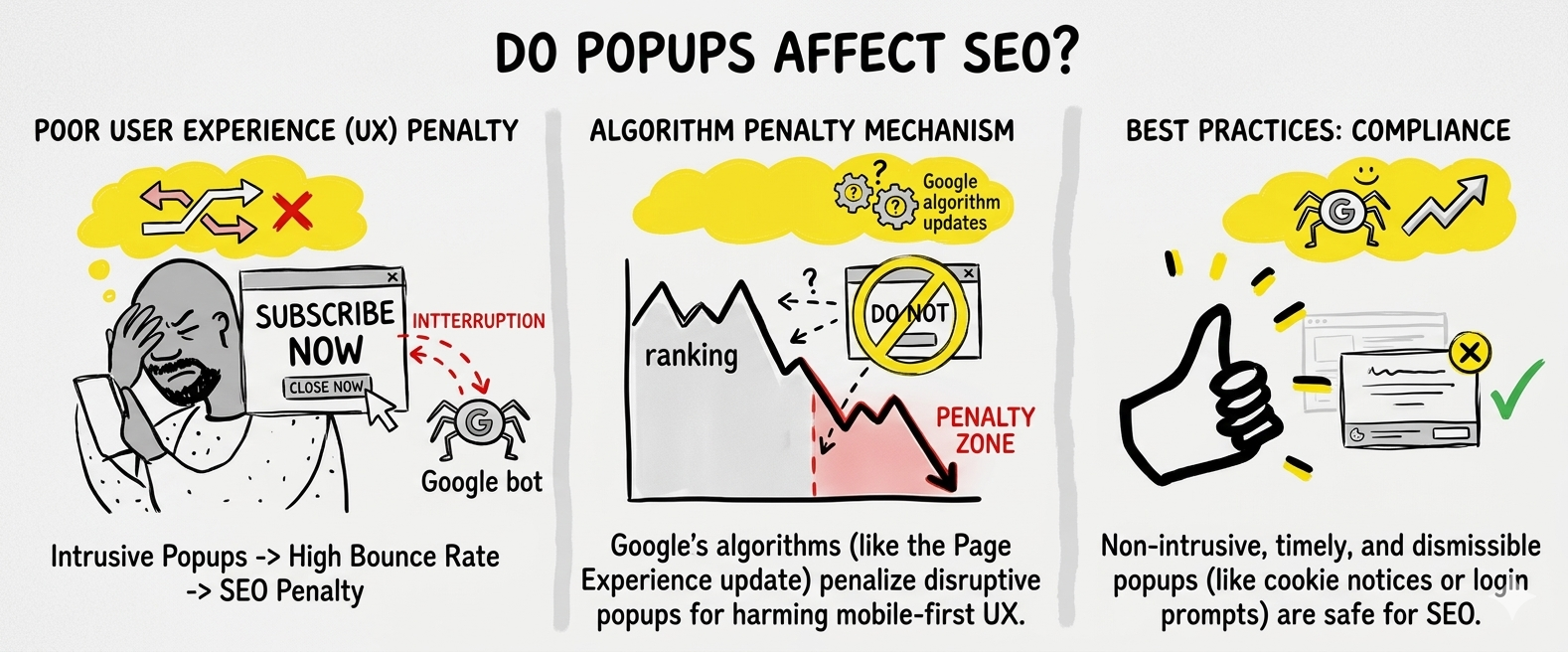
Popups do not hurt SEO, as long as they follow one specific Google guideline. Google only penalises popups that block mobile content immediately on page load. Exit intent popups, time delay popups, sticky bars, and scroll-triggered popups used correctly carry zero SEO risk and have no measurable impact on Core Web Vitals or organic rankings.
The fear around popups and SEO is widespread, but it is built on a misunderstanding of what Google actually targets. Millions of high-ranking websites run popups every day without any ranking penalty. The difference is never whether a site uses a popup. It is how and when that popup fires. This guide explains exactly where the line is, which popup formats are completely SEO-friendly, and how to use a popup without SEO penalty risk on any website or platform.
Does Google Actually Penalize Popups?
No. Do popups affect SEO? Only one specific type does, intrusive interstitials.
Google's algorithm update launched on January 10, 2017, and it targeted one specific behaviour: full-screen popups blocking mobile content on page load. That is the complete scope of the Google popup penalty. The update applied a ranking demotion to mobile pages that displayed popups blocking the main content immediately when a user arrived from search results. That is the complete scope of the penalty.
The key distinction that most websites miss is this: the penalty is about timing, device, and content coverage, not the popup itself. A popup that fires when a visitor is about to leave, or after they have been reading your page for 30 seconds, is not covered by this penalty under any interpretation of Google's guidelines.
Popup Type
Google Penalty Risk
Reason
Full-screen popup on mobile page load
🔴 Yes, penalised
Blocks content before visitor sees anything
Exit intent popup
✅ No risk
Fires on exit, content was already visible
Time delay popup (5+ seconds)
✅ No risk
Content loaded and visible before popup fires
Sticky bar / announcement bar
✅ No risk
Does not cover or replace main content
Scroll-triggered popup
✅ No risk
Visitor has engaged with content before trigger
Cookie consent banner
✅ Exempt
Google explicitly exempts legal requirement notices
The fundamental rule: if a visitor can read your page content before the popup appears, you are outside Google's penalty criteria entirely.
What Is the Google Intrusive Interstitial Penalty?
The Google intrusive interstitial penalty is a ranking demotion applied to mobile pages that display popups blocking the main content immediately when a user arrives from search results. It was launched on January 10, 2017, and remains active and enforced in 2026.
Google officially defines the penalty as targeting three specific scenarios:
A popup that covers the main content immediately after a user navigates to the page from search results, before the visitor has had any opportunity to read the content they came for
A standalone interstitial that must be dismissed before the visitor can access the page, where the content is essentially held hostage behind a popup
A layout where the above-the-fold area looks like an interstitial, the main content is pushed below the fold, and the top of the page is dominated by a promotional overlay
Understanding what the penalty does not cover is equally important. Google explicitly exempts these formats from the penalty:
Cookie consent and privacy notice banners
Age verification popups (legally required)
Login prompts for paywalled or member-only content
Any popup required by law or regulation
One critical point most websites miss: this Google popup penalty applies to mobile pages only. Desktop pages are completely unaffected. A full-screen popup on desktop, while potentially a poor user experience, carries zero Google popup penalty risk from an SEO standpoint. This means a full-screen popup on desktop, while potentially a poor user experience, carries zero Google popup penalty risk from an SEO standpoint.
The popup SEO impact of this penalty, when triggered, is a demotion in mobile search rankings for the specific page displaying the intrusive interstitial. It is not a site-wide penalty. Fix the popup behaviour on that page and the ranking recovers.
Which Popups Are Safe for SEO, and Which Are Not?
The trigger and timing of a popup determine its SEO risk, not the popup's visual format, size, or content.
The same popup design, identical copy, identical offer, identical visual, can be either completely penalty-free or actively penalised depending solely on when and how it fires. This is exactly what most websites miss when they search "are popups bad for SEO?", the answer is almost always no, but the timing makes all the difference. The honest answer is: some are, most are not, and the difference is entirely within your control.
Feature
✅ SEO Safe
❌ SEO Risk
Trigger
Exit intent, time delay (5+ sec), scroll depth, click-triggered
Immediate page load, fires before content is visible
Device
Desktop, or mobile with non-blocking compact format
Full-screen on mobile on first page load
Content Coverage
Partial screen, does not block main content
Covers entire main content area
Timing
Fires after visitor has engaged with page
Fires before visitor can see any content
Real Examples
Exit popup, sticky bar, 30-sec delay popup
Full-screen welcome mat firing on mobile load
The practical self-check for any popup you are about to publish: "Can my visitor read my page content before this popup fires?" If yes, you have zero popup SEO impact risk. If no, you need to change the trigger or the timing before publishing.
SEO-friendly popups are not a compromise. They also tend to convert better. A visitor who has read your content is more qualified and more likely to respond to your offer than one who gets hit with a popup before they have seen a single word of your page.
Do Popups Affect Core Web Vitals and Page Speed?
Yes, if the popup script is heavy and loads synchronously. No, if it is lightweight and loads asynchronously. This is the popup page speed SEO question most blog posts skip entirely, and it directly affects your rankings.
This is the technical side of popup page speed SEO that most tutorials skip. Core Web Vitals are Google's official page experience metrics, and they directly influence rankings. A poorly implemented popup script can damage all three:
LCP (Largest Contentful Paint), measures how fast your main content loads. A heavy synchronous popup script that loads before your page content delays LCP directly
CLS (Cumulative Layout Shift), measures unexpected layout shifts. A popup that appears and pushes page content around causes a CLS score increase, which Google penalises
FID (First Input Delay), measures how fast the page responds to the first user interaction. A large popup script blocking the main JavaScript thread delays FID
The good news: all three risks are entirely avoidable with the right tool. A lightweight popup script that:
Is under 50KB in file size
Loads asynchronously, meaning your page content renders first and the popup script loads in the background
Fires the popup without shifting existing layout elements
...has zero measurable Core Web Vitals impact.
SuperPopups' embed script meets all three criteria. The script is under 50KB, loads asynchronously, and the popup appears as a clean overlay without shifting any existing layout element. LCP, CLS, and FID scores are unaffected, making SuperPopups a genuinely SEO-friendly popup builder, not just in theory but in measurable Core Web Vitals scores.
Practical tip: Run your page through Google PageSpeed Insights before installing your popup script, record your scores, then run it again after installation. For a well-implemented lightweight popup script like SuperPopups, the score difference should be zero or within normal variation margin. If you see a meaningful drop, the popup script is loading synchronously and needs to be investigated.
How to Use Popups Without Hurting Your SEO (5 Rules)
Follow these five rules and your popup is fully Google-safe, regardless of the platform, the offer, or the design.
Rule 1: Never fire a full-screen popup on mobile on page load
This is the only trigger combination that activates Google's intrusive interstitial penalty. Change the trigger to exit intent, a 5+ second time delay, or scroll depth, and the risk drops to zero. If you want a popup to appear immediately on mobile, use a compact banner or sticky bar format that does not cover the main content.
Rule 2: Use a lightweight async script, under 50KB
Your popup tool's embed script must load asynchronously and stay under 50KB. This protects your Core Web Vitals scores (LCP, CLS, FID) and ensures the popup page speed SEO impact is exactly zero. Heavy scripts loading synchronously are one of the most overlooked causes of ranking drops tied to popup use. The SuperPopups, no-code popup builder uses a sub-50KB async script by default, no configuration needed.
Rule 3: Keep mobile popups small and easily dismissible
On mobile, your popup should not cover the full screen. A compact format covering 30–40% of the mobile viewport is appropriate. More importantly, the close button must be visible, easy to tap, and positioned where a thumb can reach it, Google's UX guidelines treat popup dismissibility as a signal.
Rule 4: Always include a clear, visible close button
This applies to desktop and mobile. A popup with a hidden, tiny, or hard-to-find close button is a user experience red flag that Google's quality evaluators specifically look for. The close button should be visible without scrolling or hunting for it.
Rule 5: Use page-specific targeting on organic landing pages
If a page receives significant organic search traffic and functions as a landing page, be deliberate about what popup fires on it. Use a popup builder with page-targeting controls to show relevant popups on relevant pages, and avoid showing aggressive popups on pages where the visitor arrived from a search result and has not yet read any content.
The one-question self-check: "Can my visitor read my page content before this popup fires?" If yes, you are fully safe. If no, adjust your trigger timing before publishing.
Real Example: Same Popup, One Gets Penalized, One Doesn't
Here is a concrete scenario that makes the distinction completely clear.
Two Shopify stores. Identical offer: 15% off the first order. Same popup design, same copy, same discount. The only difference is the trigger and timing.
Feature
Store A: Penalty Risk
Store B: SEO Safe
Trigger
Fires immediately on page load
Fires on exit intent after visitor browses the product page
Covers the entire page before the visitor sees any product
The visitor has already seen the full product page content
Google Penalty Risk
🔴 Yes, intrusive interstitial on mobile page load
✅ Zero, exit intent fires after the content is visible
Conversion Rate
Lower, visitor hasn't seen the product yet
Higher, visitor is already interested and qualified
The outcome for Store A: a ranking demotion on mobile search for the pages where the popup fires on load. Organic mobile traffic drops. Revenue drops.
The outcome for Store B: zero SEO impact. The exit intent popup SEO footprint is clean. And because the popup fires after the visitor has seen the product, when they are already interested and deciding, the conversion rate is also higher.
This is the counterintuitive truth about popup without SEO penalty implementation: the version that is safe for Google is almost always the version that converts better, too. Timing that respects the visitor's attention and Google's guidelines happens to be the same timing.
The Bottom Line on Popups and SEO
Popups and SEO are not enemies, one specific behaviour makes them conflict, and it is entirely avoidable. Fire a full-screen popup on mobile before your content loads and you risk a ranking demotion. Fire the same popup on exit intent, after a time delay, or on scroll depth, and Google has zero issue with it. Do popups affect SEO? Only when you trigger them the wrong way.
The five rules (never fire full-screen on mobile page load, use a lightweight async script, keep mobile popups compact and dismissible, include a visible close button, use page-specific targeting) cover every scenario. And every single one of them is handled automatically by
SuperPopups, a popup builder designed to be SEO-safe by default, with a sub-50KB async script, mobile-responsive templates, and page targeting controls built into every campaign.
No, not when implemented correctly. Google only penalises popups that block mobile content immediately on page load (intrusive interstitials). Exit intent popups, time delay popups (5+ seconds), scroll-triggered popups, and sticky bars carry zero popup SEO impact risk when paired with a lightweight async script. The vast majority of well-configured popups do not affect search rankings in any way.
2) What is Google's popup penalty?
Google's intrusive interstitial penalty launched January 10, 2017. It applies a ranking demotion to mobile pages that show popups blocking the main content immediately when a user arrives from search results. It targets full-screen, load-triggered popups on mobile only. Desktop pages are not affected. The penalty is page-specific, not site-wide, fix the popup behaviour on the affected page, and the ranking recovers.
3) Are exit intent popups bad for SEO?
No. Exit intent popup SEO risk is zero. Exit intent popups fire when the visitor's cursor moves toward the browser close button, after the page content has fully loaded and been visible to the visitor. Google's intrusive interstitial penalty specifically requires the popup to block content on page load, which exit intent popups never do. They are completely safe from an SEO standpoint.
4) Do popups affect Core Web Vitals?
They can, if the popup script is heavy and loads synchronously. A poorly implemented popup can damage LCP (content load speed), CLS (layout shift), and FID (input delay). The SuperPopups no-code popup builder script is under 50KB and loads asynchronously, zero Core Web Vitals impact. Always verify with Google PageSpeed Insights before and after installation.
5) What type of popup is safe for SEO?
SEO-friendly popup types include exit intent popups, time delay popups (minimum 5-second delay), scroll-depth triggered popups, click-triggered popups, and sticky bars. All of these allow the visitor to see and interact with your page content before the popup fires. The only format that risks the Google popup penalty is a full-screen popup firing immediately on mobile page load before any content is visible.
6) Are mobile popups penalised by Google?
Only if they block content on page load on mobile. A compact popup appearing after a time delay, on scroll depth, or on exit intent, even on mobile, is fully outside Google's penalty criteria. The mobile popup penalty Google targets is specifically about blocking content visibility before the user can read anything. As long as your page content is visible before the popup fires, you have zero risk on mobile or desktop.
Last updated on:
April 22, 2026
SuperPopups Team
The SuperPopups Team is a collective of writers and growth marketers who blend storytelling with conversion strategy. We break down complex CRO, popup optimization, and on-site engagement tactics into clear, practical content that teams can actually use. Our mission is simple: create helpful, data-driven resources that empower businesses to boost conversions, improve user experience, and grow smarter.
More Articles
May 22, 2026
13
Min Read Time
How to Set Up a Popup Funnel That Nurtures Visitors from First Visit to Conversion
Learn how to set up a popup funnel that nurtures visitors from first visit to conversion with the right popup strategy, timing, and offers.
How to Use Popups with Google Ads Landing Pages Without Hurting Quality Score
Popups can hurt your Google Ads Quality Score, but only the wrong ones. Learn which popup formats are safe for PPC landing pages and how to set them up.
What Is Popup Fatigue and How to Avoid It on Your Website
Popup fatigue kills conversions silently. Learn what it is, what causes it, and 6 proven fixes to avoid it on your website without removing your popups.
Sleeknote Alternatives: Best Popup Builders to Consider in 2026
Sleeknote too expensive? Discover the 4 best popup builder alternatives in 2026, one is free forever. Compare features, pricing & find the right fit for you.
Popups for Online Coaches and Course Creators: Grow Your List and Sell More Courses
Coaches lose leads daily from visitors who don't subscribe or enroll. Learn how popups for online coaches grow your list and sell more courses, FREE with SuperPopups.
Popup for Restaurant Websites: How to Drive More Reservations and Signups
Do restaurant websites need popups? Yes, they convert menu browsers into table bookings and email signups. See which popup types work best, free with SuperPopups.
Popup for Real Estate Websites: How Agents Capture More Leads Online
Real estate agents lose leads daily from property browsers who don't enquire. Learn how a popup for real estate websites captures more leads free with SuperPopups.
Cart Abandonment vs Exit Intent: What's the Difference and Which Should You Use?
Cart abandonment popups convert at up to 17% on cart pages. Exit intent works on every page. Learn the real difference and when to use each, plus how to set both up free.
How to Use Popups to Grow a Shopify Store: Complete 2026 Strategy Guide
Want to grow your Shopify store with popups? This 2026 guide covers every popup type, trigger, placement & setup, email capture, exit intent, cart abandonment & more.
How to Add a Popup to Wix Without a Plugin (No Code)
Learn how to add a popup to Wix without a plugin using no-code methods. Follow our simple step-by-step guide to create stunning popups on your Wix website fast.
How to Add a Popup to Your Squarespace Website (No Code)
Learn how to add a popup to your Squarespace website without any code or plugin. Use SuperPopups to launch email capture, exit intent & discount popups in minutes.
How to Use Popups on Blog Posts Without Hurting Readership
Learn how to add popups to blog posts without hurting readership. Timing, triggers & placement tips to grow your email list while keeping readers engaged.
Free Popup Builder for Small Businesses: Best No-Cost Tool in 2026
The best free popup builder for small businesses in 2026, No credit card, no code, no expiry. Capture emails, recover abandoning visitors, and grow sales from day one.
Popup Templates: How to Choose the Right Design for Your Goal
Discover how to choose the right popup templates for your goal. Explore popup design tips to boost conversions, grow leads, and engage visitors effectively.
How to Create a Popup for Your WordPress Website (Free, No Plugin Required)
Create a popup for your WordPress website in under 5 minutes, free, no plugin, no coding. Step-by-step setup guide using a lightweight script that won't slow your site.
How to Use Popups to Promote Flash Sales and Limited-Time Offers
Learn how to use flash sale popups to drive urgency, boost conversions, and promote limited-time offers, with countdown timers, triggers, and real examples.
Newsletter Popup: How to Get More Subscribers Without Being Annoying
Learn how to use a newsletter popup to grow your subscriber list fast, without annoying visitors. Tips to boost signups while keeping your user experience smooth.
Do Popups Affect SEO? How to Use Them Without Getting Penalized
Popups don't hurt SEO, unless they break one Google rule. Learn which popups trigger the intrusive interstitial penalty and how to use them safely in 2026.
Add a popup to your Shopify store without installing an app. One lightweight script, no code, no App Store fees, live in under 10 minutes. Here's exactly how to do it.
Popup vs Banner: What's the Difference and Which Converts Better?
Popup vs banner, what's the difference, and which converts better? Compare both formats and find out which drives more leads, clicks, and sales for your website.
Learn how to write popup copy that converts, headline formulas, CTA button text, and micro-copy tips backed by data. First-person CTAs alone can lift clicks by 90%.
Popup for Ecommerce: How to Use Popups to Increase Sales
70% of shoppers abandon their cart. Ecommerce popups fix that. Learn which popup types convert best, what to offer, and how to set one up in under 10 minutes.
Learn how to reduce bounce rate with exit intent popups. Discover proven strategies to re-engage leaving visitors and boost conversions on your website.
How to Use Popups for Lead Generation (Complete Guide)
Learn how to use popups for lead generation with proven strategies, timing tips, and design best practices to capture more leads and grow your email list fast.
Popup Conversion Rate: What's a Good Rate & How to Improve It
Learn what a good popup conversion rate is, industry benchmarks, and proven tips to improve your popup performance and boost conversions. Start optimizing today.
Email Capture Popup: How to Grow Your Email List Faster
Learn how email capture popups grow your email list faster. Types, triggers, best practices & real examples. Start converting visitors into subscribers today.
How to Add a Popup to Your Website in 5 Minutes (No Code)
Learn how to add a popup to your website in just 5 minutes, no coding required. Step-by-step guide to launch your first popup and capture more leads today.
No-Code Popup Builder: What It Is & Why It Matters (2026)
A no-code popup builder lets you create exit intent, email capture & discount popups without coding. Learn what it is, how it works & why it matters in 2026.
Looking for the best popup builder for Shopify? This 2026 guide covers top tools for exit intent popups, email capture, discount popups, and cart abandonment, with free plan options included.
Popup Design Best Practices: UI, UX & Psychology for Higher Conversions 2026
Popup design best practices 2026: UI, UX, and psychology tips to create high‑converting popups that reduce friction, boost engagement, and respect user experience.
Popup Builder vs WordPress Popup Plugin: Which is Better in 2026?
WordPress popup plugins slow your site 30-50%. Script-based builders like SuperPopups are faster, flexible, and work on any platform. Free plan available.
Top 5 OptinMonster Alternatives to Boost Conversions in 2026
Looking for the best OptinMonster alternatives? Find top 5 powerful popup and lead generation tools for 2026 with features, pricing, and tips to boost conversions
What Is a Lightbox Popup and Why SaaS Businesses Should Use It?
Learn what a lightbox popup is and why it is most importance for SaaS businesses. Know about its benefits, examples, and tools to increase sign-ups and engagement.
Find the top 10 best popup builders of 2025 to boost conversions, capture leads, and reduce cart abandonment. Compare features and pricing to choose the right popup software for your website.
What Are the Types of Website Popups? The Complete Guide for SaaS Businesses in 2025
Learn the different types of popups, designed to boost conversions without ruining user experience. And how SuperPopups help your SaaS business growth.
SuperPopups vs. OptiMonk: Complete Comparison Guide 2026
Compare SuperPopups vs. OptiMonk to find the best popup builder for your business. Find key differences in pricing, features, ease of use, and conversion performanceupdated for 2025.
Find the Webflow powerful pop-up builder tool to boost conversions, capture leads, and enhance user engagement without coding. Easily create, customize, and manage popups in Webflow.




.avif)








.jpg)










.jpg)



.jpg)





.jpg)

.jpg)
.jpg)


.jpg)







