How to Create a Popup for Your WordPress Website (Free, No Plugin Required)
April 16, 2026
12
Min Read Time
You can create a popup for your WordPress website in under 5 minutes, no plugin required, no coding knowledge needed, and no performance impact on your site. The easiest method is using a script-based no-code popup builderlike SuperPopups: build your popup, copy a single JavaScript snippet, paste it into your WordPress theme's <head> tag, and you're live. WordPress popups convert 3–11% of visitors on average, outperforming embedded sidebar forms by more than 100%, and work on every WordPress theme without touching a single page template. Whether you need a WordPress popup free setup for a blog or a fully triggered lead capture overlay for a WooCommerce store, this guide covers the exact process.
If you've tried to add popup to WordPress before, you've probably hit one of two walls. Either you installed a plugin that looked great in the screenshots but made your site noticeably slower, or you attempted the custom HTML/CSS route and got tangled in code you didn't write and can't debug. There is a third option, and it takes under 5 minutes. Neither option is how this should work.
The reality is that WordPress doesn't have a native popup feature. The platform was designed for content, not conversion overlays. That means every WordPress popup solution adds something on top, whether that's a plugin installed directly in WP Admin or an external script loaded asynchronously. The difference between those two approaches is significant, and it's worth understanding before you build anything.
Why Add a Popup to Your WordPress Website?
Because your WordPress website is generating traffic you're not converting. Every visitor who lands on a blog post, browses a product page, or reads your pricing page and then leaves without taking action is traffic that cost you something, whether that's ad spend, SEO effort, or time. A properly configured WordPress popup is what turns that anonymous traffic into subscribers, leads, and paying customers.
Here's why adding a popup for WordPress is one of the highest-ROI changes you can make to any site:
Popups convert 3–11% of visitors across formats, compared to 0.5–1% for sidebar or footer embedded forms
Discount popups convert at 7.45% on average, 62% higher than popups with no offer
Click-triggered popups reach 54.42% CVR, the highest of any popup trigger type
Mobile popups drive more engagement than desktop, 5.3% vs 3.11% CVR according to Drip's research
Popups work 24/7 without manual effort after initial setup, no page editing required
They integrate directly with Mailchimp, HubSpot, Klaviyo, and any other email tool you already use
They work on every WordPress theme, Divi, Elementor, Astra, Blocksy, and GeneratePress, with no compatibility issues with a script-based approach
The question isn't whether your WordPress site needs a popup. It's whether the popup you set up is configured to actually convert.
WordPress Popup Plugin vs. No-Code Popup Builder: What's the Difference?
This is the most important decision you'll make before building your first WordPress popup, and most guides skip over it entirely.
There are two ways to add a popup to a WordPress website: install a WordPress popup plugin directly in WP Admin, or embed a lightweight script from an external popup builder for WordPress like SuperPopups. They look similar on the surface; both give you a visual editor and behavioral triggers, but they behave very differently under the hood.
Feature
WordPress Popup Plugin
SuperPopups (Script-Based)
Installation Method
Plugin installed in WP Admin
Single JS snippet in <head> tag
Page Weight Added
200–500KB+ per load
<50KB, async (non-blocking)
Core Web Vitals Impact
Can increase LCP and CLS
Zero impact — loads asynchronously
WordPress Database Usage
Yes — stores data in WP DB
No — external platform
Works on Other Platforms
No — WordPress only
Yes — Shopify, Webflow, any HTML site
Update Management
Manual plugin updates required
Automatic — no WP updates needed
Free Plan Available
Varies
✅ Yes — no credit card required
Setup Time
15–30 minutes
Under 5 minutes
The performance difference matters more than most people realize. Only 44% of WordPress mobile sites currently pass all three Core Web Vitals assessments, and popup plugins are a significant contributor to that failure rate. If you want to add popup to WordPress without plugin overhead, the script-based approach is the only method that gives you full popup functionality at zero performance cost. Popup plugins that load synchronously, add DOM elements before page render, or write frequently to the WordPress database are a direct contributor to that failure rate. Sites running 25+ plugins, which is the average WordPress installation, can see TTFB (Time to First Byte) increases of 300–800ms per poorly coded plugin.
A script-based no-code popup builder for WordPress, like SuperPopups, loads asynchronously after page content renders, has zero database footprint, and adds less than 50KB to your page weight. For any WordPress site where performance and SEO rankings matter, that difference is meaningful.
How to Create a Popup for Your WordPress Website Using SuperPopups (Step-by-Step)
This is the complete process to add popup to WordPress using SuperPopups, free, no credit card, no developer. You'll go from zero to a live, configured popup in under 10 minutes.
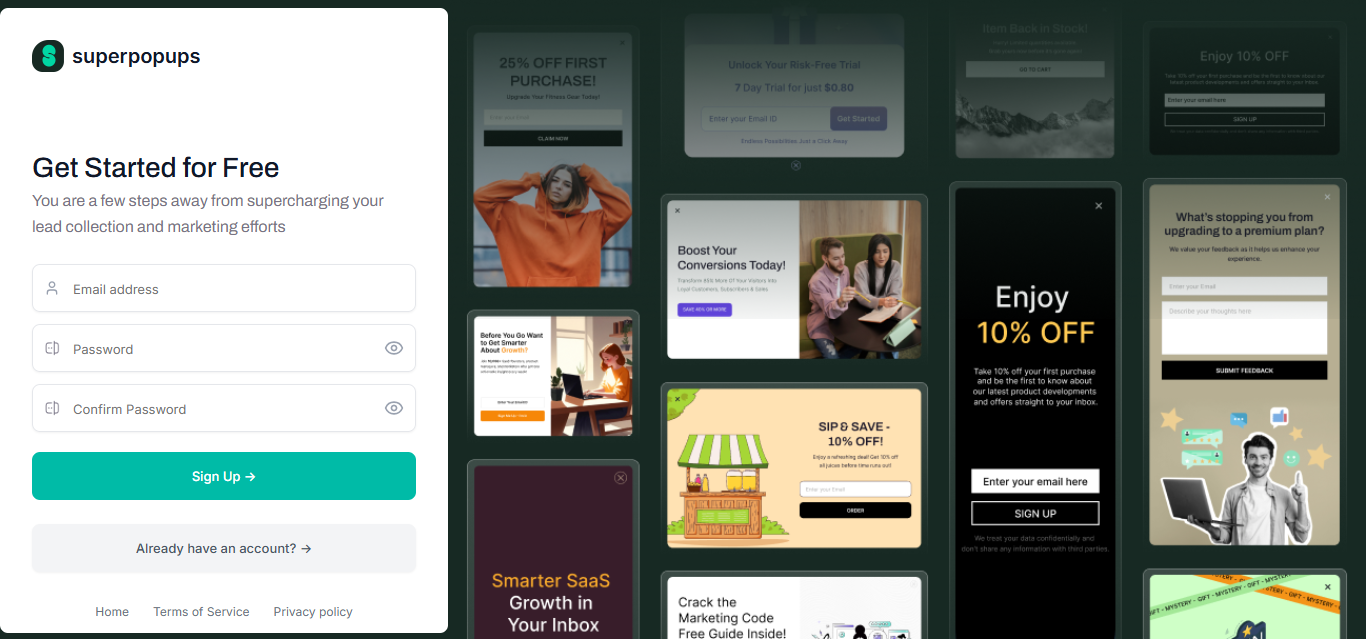
Step 1: Sign Up for SuperPopups (Free, No Credit Card)
Go to superpopups.com and create your free account. No credit card required. The free plan gives you full access to the WordPress popup builder, all template types, behavioral triggers (exit intent, scroll depth, time delay, click-triggered), and a live analytics dashboard. This is your WordPress popup free starting point, everything needed to create popup in WordPress without spending anything.
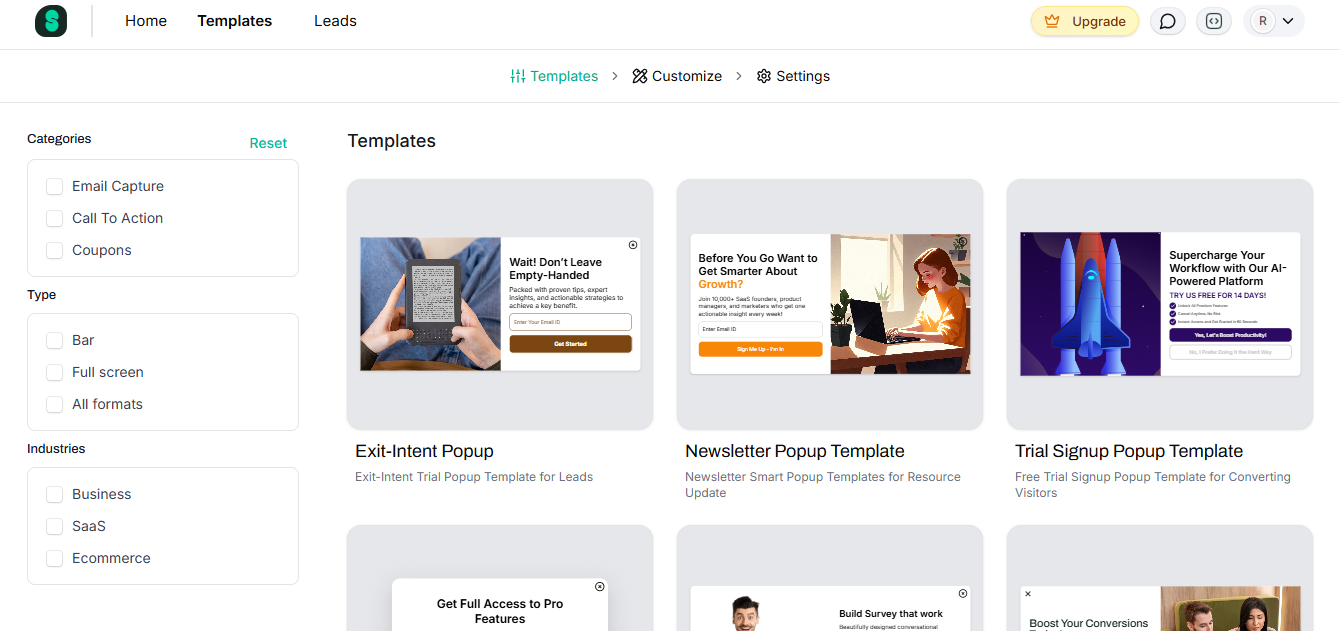
Step 2: Choose a Popup Template
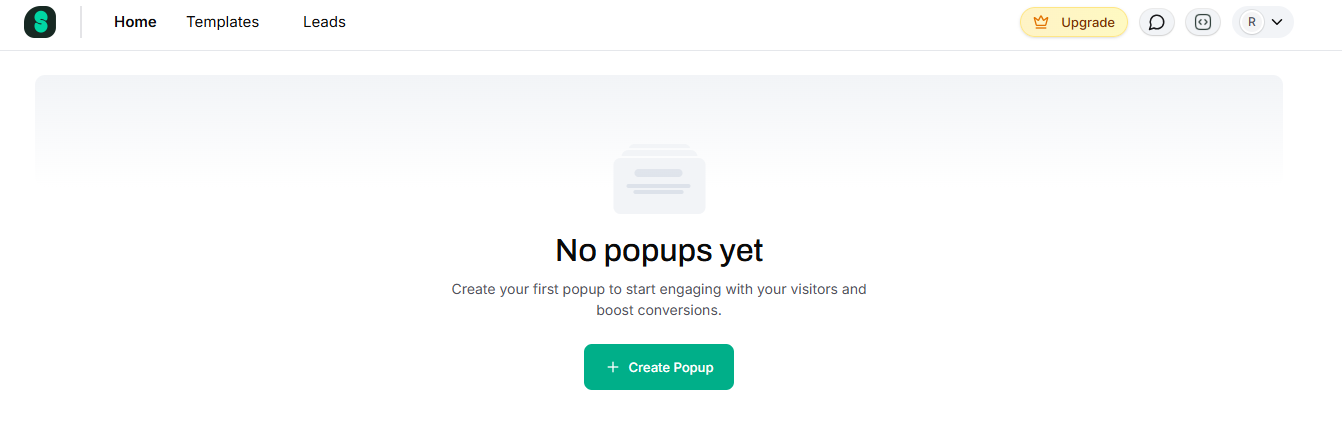
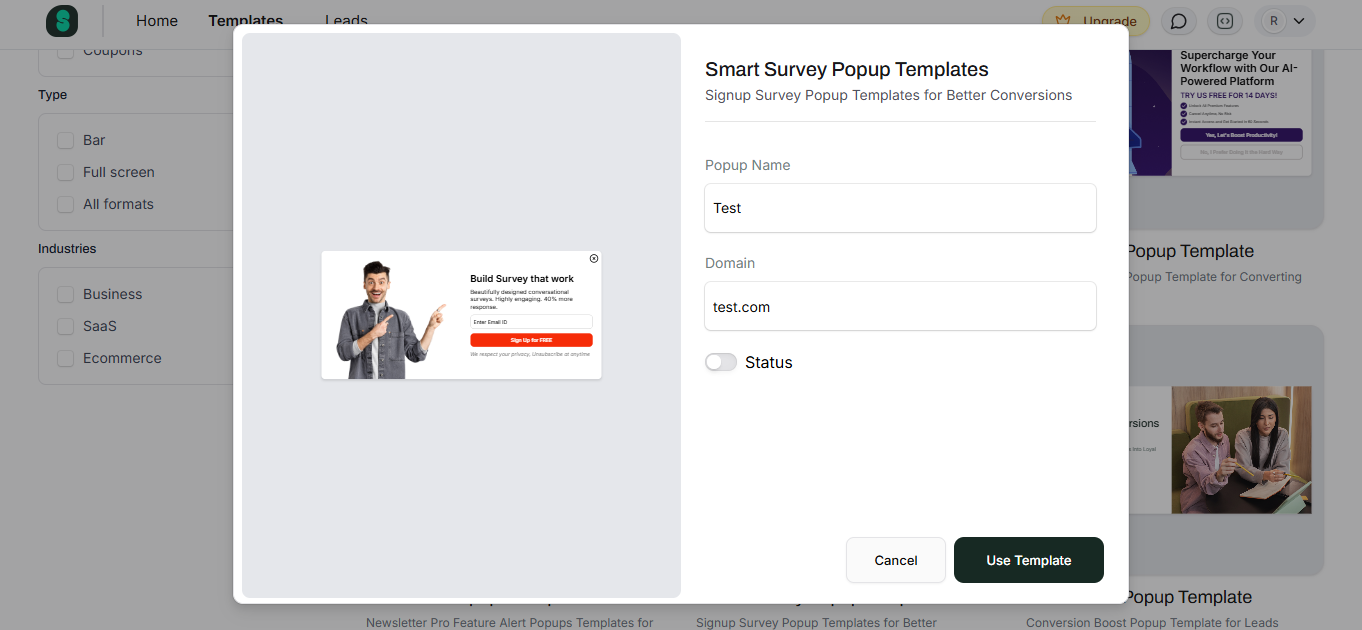
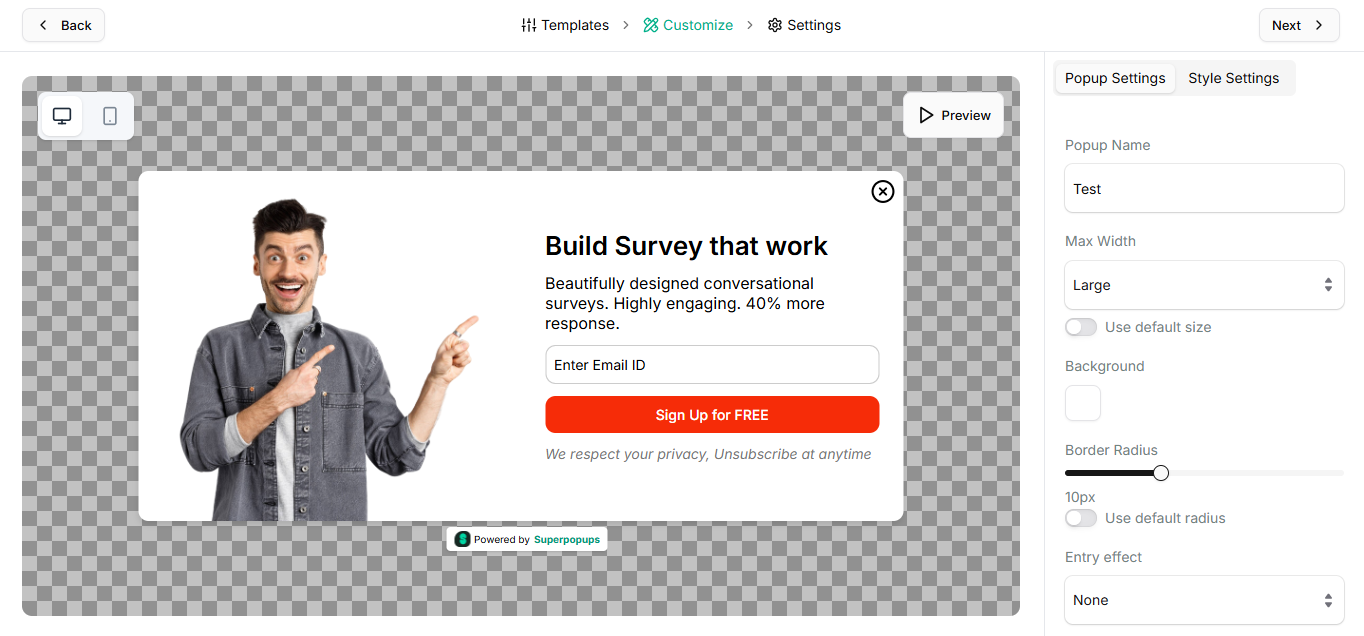
Once inside the dashboard, click "Create New Popup" and browse the popup templateslibrary. Templates are organized by use case: email capture, lead generation, exit intent, discount/coupon, announcement, and newsletter. Choose the template that matches your goal. Pre-built templates are already structured around what converts, headline placement, field positioning, and CTA prominence, so don't start from a blank canvas when tested layouts already exist.
For a WordPress blog, a scroll-triggered newsletter template works well. For a WooCommerce store, start with an exit intent discount template.
Step 3: Customize Your Headline, Offer, and CTA
This is where your WordPress website popup design comes together. Three things determine whether your popup converts or gets closed immediately:
Headline formula that works: [Specific Outcome] + [Timeframe or Ease]
✅ "Get 30 Email Subject Lines That Double Open Rates, Free."
✅ "Weekly WordPress Growth Tips, Straight to Your Inbox Every Tuesday."
❌ "Subscribe to Our Newsletter."
❌ "Sign Up for Updates."
CTA button: Use first-person copy. "Send Me the Guide" outperforms "Download" in A/B tests. "Yes, I Want 15% Off" beats "Claim Discount." The popup maker editor lets you change button text, color, and size without touching a line of code.
Trust micro-copy: Add one line below the CTA button, "No spam. Unsubscribe anytime." It's a small addition that visibly reduces hesitation, especially for first-time visitors.
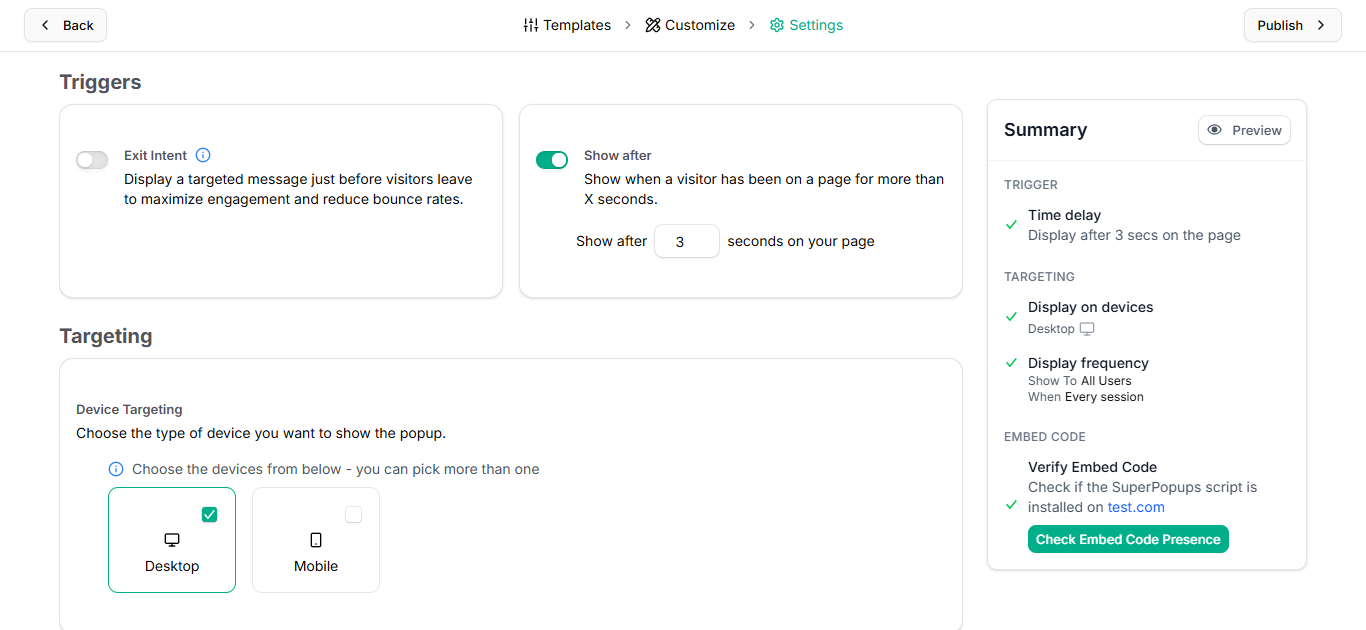
Step 4: Set Your Trigger and Targeting Rules
Your trigger determines when the popup appears. Your targeting rules determine who sees it. Both matter equally for create popup in WordPress campaigns that actually convert.
Trigger options:
Exit intent popup WordPress, cursor moves toward close button; highest-value trigger for product pages, pricing pages, and cart pages (top campaigns: 19.77% CVR)
Time delay (5–8 seconds), gives visitors time to orient before the popup appears; best for homepages
Click-triggered, fires when a specific button or link is clicked; highest CVR at 54.42%
Targeting rules:
New visitors → welcome offer or newsletter signup
Returning visitors → loyalty offer or different content upgrade
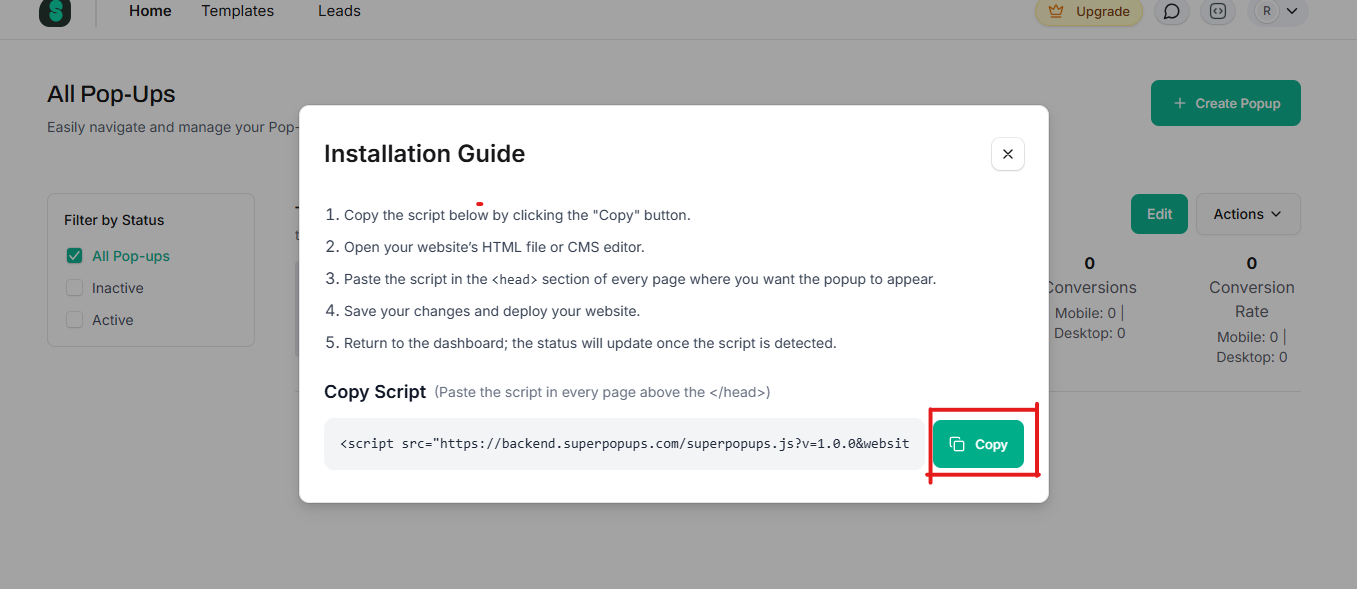
Step 5: Copy Your Embed Script
When your popup is configured, go to the "Embed" or "Publish" section in your SuperPopups dashboard. You'll see a single lightweight JavaScript snippet; this is your embed code. Copy it. This is the only piece of code you'll need to interact with.
Step 6: Add the Script to WordPress
This is how to add popup to WordPress using the script method, the fastest, safest, and most SEO-friendly approach available in 2026. You have two options:
Option A: Theme Editor (direct):
In your WordPress dashboard, go to Appearance → Theme Editor
Select your active theme and open the header.php file
Paste your SuperPopups script just before the closing </head> tag
Click "Update File"
Important: If you're using a theme that receives regular updates, create a child theme first so your changes aren't overwritten on the next update.
Option B: Insert Headers and Footers Plugin (easier):
Install the free "Insert Headers and Footers" plugin (by WPCode)
Go to Settings → Insert Headers and Footers
Paste your SuperPopups script in the "Scripts in Header" field
Save
Option B is safer for non-technical users; it doesn't require editing theme files directly and survives theme updates without any additional setup.
Step 7: Preview, Test, and Go Live
Before your popup reaches real visitors, run through this final checklist:
✅ Preview on desktop, check layout, button size, and close button visibility ✅ Preview on mobile, confirm it doesn't block the entire screen on small devices ✅ Set frequency cap, "Once per session" minimum, "Once per 7 days" recommended ✅ Enable suppression for converted visitors, never show the popup to someone who has already subscribed ✅ Connect your email integration, Mailchimp, HubSpot, Klaviyo, or ActiveCampaign
Once everything checks out, publish the popup and let it run. Give it at least 14 days and 300+ displays before making any changes; small sample sizes produce misleading data.
What Types of WordPress Popups Can You Create?
SuperPopups supports every major popup for the WordPress format. Here's the full breakdown with the best use case for each:
Popup Type
How It Triggers
Best Use Case
Avg CVR
Modal Popup
Time delay or scroll
Email capture, lead gen, newsletter
3.49–4.82%
Exit Intent Popup
Cursor toward close button
Cart recovery, last-chance offer, blog exit
3.94% avg / 19.77% top
Sticky Bar / Announcement
Always visible
Site-wide sale, announcement, free shipping bar
~3.69%
Slide-In Popup
Scroll depth or time delay
Blog content upgrades, low-friction capture
~3.5%
Fullscreen Popup
Page load (with delay)
High-stakes lead gen, age gate, welcome mat
Varies
Gamified (Spin-to-Win)
Page load or exit
eCommerce discount, list building
10.15–30.38%
Click-Triggered Popup
Visitor clicks a button
High-intent offer delivery, demo request
22.65–54.42%
For most WordPress blogs and business sites, start with a scroll-triggered modal popup (50% scroll depth) for email capture and an exit intent popup on high-value pages. Add click-triggered popups to specific CTAs once those are live.
Does Adding a Popup Slow Down My WordPress Website?
It depends entirely on which method you use. A WordPress popup builder that installs as a plugin behaves very differently from a script-based approach, and the difference shows up directly in your Core Web Vitals scores and organic rankings.
WordPress popup plugins can slow your site. Most WordPress popup plugins load their own CSS, JavaScript, and database queries on every page, even pages where no popup is configured to appear. Heavy popup plugins add 200–500KB+ to your page weight and can introduce layout shifts (CLS violations) if the popup injects HTML before the rest of the page finishes rendering.
SuperPopups' script method does not slow your site. Here's why:
The embed script loads asynchronously, and it never blocks the main page from rendering
Total script weight is under 50KB, a fraction of what most popup plugins add
No WordPress database queries, all popup data lives on SuperPopups' servers, not yours
Zero CLS risk, the popup appears over content rather than shifting page elements
Compatible with every WordPress caching and performance plugin (WP Rocket, NitroPack, LiteSpeed Cache)
If your WordPress site is already struggling to pass Core Web Vitals, and only 44% of WordPress mobile sites currently do, switching from a popup plugin to a script-based approach is one of the easiest wins available. You keep the functionality. You lose the performance cost.
FAQs
1) How do I add a popup to a WordPress website for free?
Sign up for a free SuperPopups account at superpopups.com, build your popup using the visual editor, copy the embed script from your dashboard, and paste it into your WordPress theme's <head> tag using the Theme Editor or the Insert Headers and Footers plugin. The entire process takes under 10 minutes. No credit card is needed for the free plan, and there's no limit on popup displays.
2) Do I need a plugin to create a popup in WordPress?
No. You can create a popup in WordPress without a plugin by using a script-based popup builder like SuperPopups. You get all the functionality of a plugin, visual editor, behavioral triggers, targeting rules, and A/B testing, without any of the performance overhead. The only thing you install is a single lightweight JavaScript snippet, which loads asynchronously and has no impact on your WordPress Core Web Vitals.
3) What is the best popup for a WordPress website in 2026?
The best popup for a WordPress website in 2026 depends on your goal. For email capture on blog content, a scroll-triggered popup at 50% depth performs best (avg 5.37% CVR). For recovering abandoned visitors, an exit intent popup WordPress configuration works best on product and pricing pages (top campaigns: 19.77%). For maximum conversion rate overall, click-triggered popups average 54.42% CVR because visitors self-select. SuperPopups supports all three formats on a free plan.
4) Will a popup plugin slow down my WordPress site?
Popup plugins that load synchronously, write to the WordPress database, or inject HTML before page render can slow your site and harm Core Web Vitals scores. Only 44% of WordPress mobile sites currently pass all Core Web Vitals. Using a script-based popup builder for WordPress, like SuperPopups, avoids this entirely. The embed script is under 50KB, loads asynchronously, has no database footprint, and doesn't touch your Core Web Vitals metrics.
5) Can I create an exit intent popup for WordPress without coding?
Yes. SuperPopups includes exit intent detection as a built-in trigger option, no code required to enable it. In the popup builder, select "Exit Intent" as your trigger type, and the platform handles the cursor tracking and mobile scroll-up detection automatically. You can configure an exit intent popup WordPress campaign in under 5 minutes with zero coding using the visual editor.
6) How do I show a popup only on specific pages in WordPress?
Use page-level targeting rules in SuperPopups. In your popup settings, add URL matching rules, for example, show the popup only on URLs containing /blog/ for content upgrades, or only on /pricing for free trial CTAs. You can also set exclusions: suppress the popup on thank-you pages, checkout pages, or for visitors who have already converted. Page-level targeting consistently improves WordPress popup conversion rates by 2–3x compared to sitewide generic campaigns.
Last updated on:
April 30, 2026
SuperPopups Team
The SuperPopups Team is a collective of writers and growth marketers who blend storytelling with conversion strategy. We break down complex CRO, popup optimization, and on-site engagement tactics into clear, practical content that teams can actually use. Our mission is simple: create helpful, data-driven resources that empower businesses to boost conversions, improve user experience, and grow smarter.
More Articles
May 22, 2026
13
Min Read Time
How to Set Up a Popup Funnel That Nurtures Visitors from First Visit to Conversion
Learn how to set up a popup funnel that nurtures visitors from first visit to conversion with the right popup strategy, timing, and offers.
How to Use Popups with Google Ads Landing Pages Without Hurting Quality Score
Popups can hurt your Google Ads Quality Score, but only the wrong ones. Learn which popup formats are safe for PPC landing pages and how to set them up.
What Is Popup Fatigue and How to Avoid It on Your Website
Popup fatigue kills conversions silently. Learn what it is, what causes it, and 6 proven fixes to avoid it on your website without removing your popups.
Sleeknote Alternatives: Best Popup Builders to Consider in 2026
Sleeknote too expensive? Discover the 4 best popup builder alternatives in 2026, one is free forever. Compare features, pricing & find the right fit for you.
Popups for Online Coaches and Course Creators: Grow Your List and Sell More Courses
Coaches lose leads daily from visitors who don't subscribe or enroll. Learn how popups for online coaches grow your list and sell more courses, FREE with SuperPopups.
Popup for Restaurant Websites: How to Drive More Reservations and Signups
Do restaurant websites need popups? Yes, they convert menu browsers into table bookings and email signups. See which popup types work best, free with SuperPopups.
Popup for Real Estate Websites: How Agents Capture More Leads Online
Real estate agents lose leads daily from property browsers who don't enquire. Learn how a popup for real estate websites captures more leads free with SuperPopups.
Cart Abandonment vs Exit Intent: What's the Difference and Which Should You Use?
Cart abandonment popups convert at up to 17% on cart pages. Exit intent works on every page. Learn the real difference and when to use each, plus how to set both up free.
How to Use Popups to Grow a Shopify Store: Complete 2026 Strategy Guide
Want to grow your Shopify store with popups? This 2026 guide covers every popup type, trigger, placement & setup, email capture, exit intent, cart abandonment & more.
How to Add a Popup to Wix Without a Plugin (No Code)
Learn how to add a popup to Wix without a plugin using no-code methods. Follow our simple step-by-step guide to create stunning popups on your Wix website fast.
How to Add a Popup to Your Squarespace Website (No Code)
Learn how to add a popup to your Squarespace website without any code or plugin. Use SuperPopups to launch email capture, exit intent & discount popups in minutes.
How to Use Popups on Blog Posts Without Hurting Readership
Learn how to add popups to blog posts without hurting readership. Timing, triggers & placement tips to grow your email list while keeping readers engaged.
Free Popup Builder for Small Businesses: Best No-Cost Tool in 2026
The best free popup builder for small businesses in 2026, No credit card, no code, no expiry. Capture emails, recover abandoning visitors, and grow sales from day one.
Popup Templates: How to Choose the Right Design for Your Goal
Discover how to choose the right popup templates for your goal. Explore popup design tips to boost conversions, grow leads, and engage visitors effectively.
How to Create a Popup for Your WordPress Website (Free, No Plugin Required)
Create a popup for your WordPress website in under 5 minutes, free, no plugin, no coding. Step-by-step setup guide using a lightweight script that won't slow your site.
How to Use Popups to Promote Flash Sales and Limited-Time Offers
Learn how to use flash sale popups to drive urgency, boost conversions, and promote limited-time offers, with countdown timers, triggers, and real examples.
Newsletter Popup: How to Get More Subscribers Without Being Annoying
Learn how to use a newsletter popup to grow your subscriber list fast, without annoying visitors. Tips to boost signups while keeping your user experience smooth.
Do Popups Affect SEO? How to Use Them Without Getting Penalized
Popups don't hurt SEO, unless they break one Google rule. Learn which popups trigger the intrusive interstitial penalty and how to use them safely in 2026.
Add a popup to your Shopify store without installing an app. One lightweight script, no code, no App Store fees, live in under 10 minutes. Here's exactly how to do it.
Popup vs Banner: What's the Difference and Which Converts Better?
Popup vs banner, what's the difference, and which converts better? Compare both formats and find out which drives more leads, clicks, and sales for your website.
Learn how to write popup copy that converts, headline formulas, CTA button text, and micro-copy tips backed by data. First-person CTAs alone can lift clicks by 90%.
Popup for Ecommerce: How to Use Popups to Increase Sales
70% of shoppers abandon their cart. Ecommerce popups fix that. Learn which popup types convert best, what to offer, and how to set one up in under 10 minutes.
Learn how to reduce bounce rate with exit intent popups. Discover proven strategies to re-engage leaving visitors and boost conversions on your website.
How to Use Popups for Lead Generation (Complete Guide)
Learn how to use popups for lead generation with proven strategies, timing tips, and design best practices to capture more leads and grow your email list fast.
Popup Conversion Rate: What's a Good Rate & How to Improve It
Learn what a good popup conversion rate is, industry benchmarks, and proven tips to improve your popup performance and boost conversions. Start optimizing today.
Email Capture Popup: How to Grow Your Email List Faster
Learn how email capture popups grow your email list faster. Types, triggers, best practices & real examples. Start converting visitors into subscribers today.
How to Add a Popup to Your Website in 5 Minutes (No Code)
Learn how to add a popup to your website in just 5 minutes, no coding required. Step-by-step guide to launch your first popup and capture more leads today.
No-Code Popup Builder: What It Is & Why It Matters (2026)
A no-code popup builder lets you create exit intent, email capture & discount popups without coding. Learn what it is, how it works & why it matters in 2026.
Looking for the best popup builder for Shopify? This 2026 guide covers top tools for exit intent popups, email capture, discount popups, and cart abandonment, with free plan options included.
Popup Design Best Practices: UI, UX & Psychology for Higher Conversions 2026
Popup design best practices 2026: UI, UX, and psychology tips to create high‑converting popups that reduce friction, boost engagement, and respect user experience.
Popup Builder vs WordPress Popup Plugin: Which is Better in 2026?
WordPress popup plugins slow your site 30-50%. Script-based builders like SuperPopups are faster, flexible, and work on any platform. Free plan available.
Top 5 OptinMonster Alternatives to Boost Conversions in 2026
Looking for the best OptinMonster alternatives? Find top 5 powerful popup and lead generation tools for 2026 with features, pricing, and tips to boost conversions
What Is a Lightbox Popup and Why SaaS Businesses Should Use It?
Learn what a lightbox popup is and why it is most importance for SaaS businesses. Know about its benefits, examples, and tools to increase sign-ups and engagement.
Find the top 10 best popup builders of 2025 to boost conversions, capture leads, and reduce cart abandonment. Compare features and pricing to choose the right popup software for your website.
What Are the Types of Website Popups? The Complete Guide for SaaS Businesses in 2025
Learn the different types of popups, designed to boost conversions without ruining user experience. And how SuperPopups help your SaaS business growth.
SuperPopups vs. OptiMonk: Complete Comparison Guide 2026
Compare SuperPopups vs. OptiMonk to find the best popup builder for your business. Find key differences in pricing, features, ease of use, and conversion performanceupdated for 2025.
Find the Webflow powerful pop-up builder tool to boost conversions, capture leads, and enhance user engagement without coding. Easily create, customize, and manage popups in Webflow.



.avif)








.jpg)










.jpg)


.jpg)





.jpg)

.jpg)
.jpg)


.jpg)







